Production Statistics
1. Module Overview
Core Function: The Production Statistics module is a core analysis tool in the LMES system, aimed at accurately counting and analyzing the output and non-conforming product data of the production line. Through multi-dimensional data visualization, it helps managers monitor production status in real-time, locate efficiency bottlenecks, and trace quality problems, thereby providing data-driven decision support for production management optimization and efficiency improvement.
- Component Identifier: StationBeatAnalysis
- Component Name: Production Statistics
- Component Category: run (Plugin)
2. Scenario Description
- Identify Production Bottlenecks: When the overall efficiency of the production line does not meet expectations, production managers can use the "Process Beat Analysis" of this module to compare the "Theoretical Processing Cycle" and "Actual Processing Cycle" of each process to quickly locate the bottleneck station with the longest time consumption.
- Quality Problem Traceability: When a batch of products is unqualified, quality engineers can view the Pareto chart of non-conformance reasons through the "Non-conformance Statistical Analysis" function to concentrate resources on solving the root causes leading to the most problems.
- Daily Performance Management: Workshop supervisors can quickly view key indicators such as daily output, output per unit time (Pcs/h), and daily completion rate through the "Output Statistics" dashboard every day to intuitively grasp the achievement of production goals.
- Continuous Improvement Assessment: After improving a certain process, engineers can use the XMR control chart in "Process Detail Analysis" to assess whether the improvement measures have brought stable and effective production beat improvement.
3. Function Introduction
-
Interface Overview: The main interface of the module consists of top navigation, data filter area, key performance indicator (KPI) card area, and chart analysis area. Users can switch between different analysis themes through the "Output Statistics", "Process Beat Analysis", and "Non-conformance Statistical Analysis" tabs at the top. All analyses support flexible filtering by process segment, product model, and time range.
-
3.1 Output Statistics
-
This function page focuses on core output data. The top KPI cards intuitively display the total output, output per unit time (Pcs/h), and average production beat within the specified time range. The chart area below provides two dimensions of analysis views: "Time Grouping" and "Process Grouping":
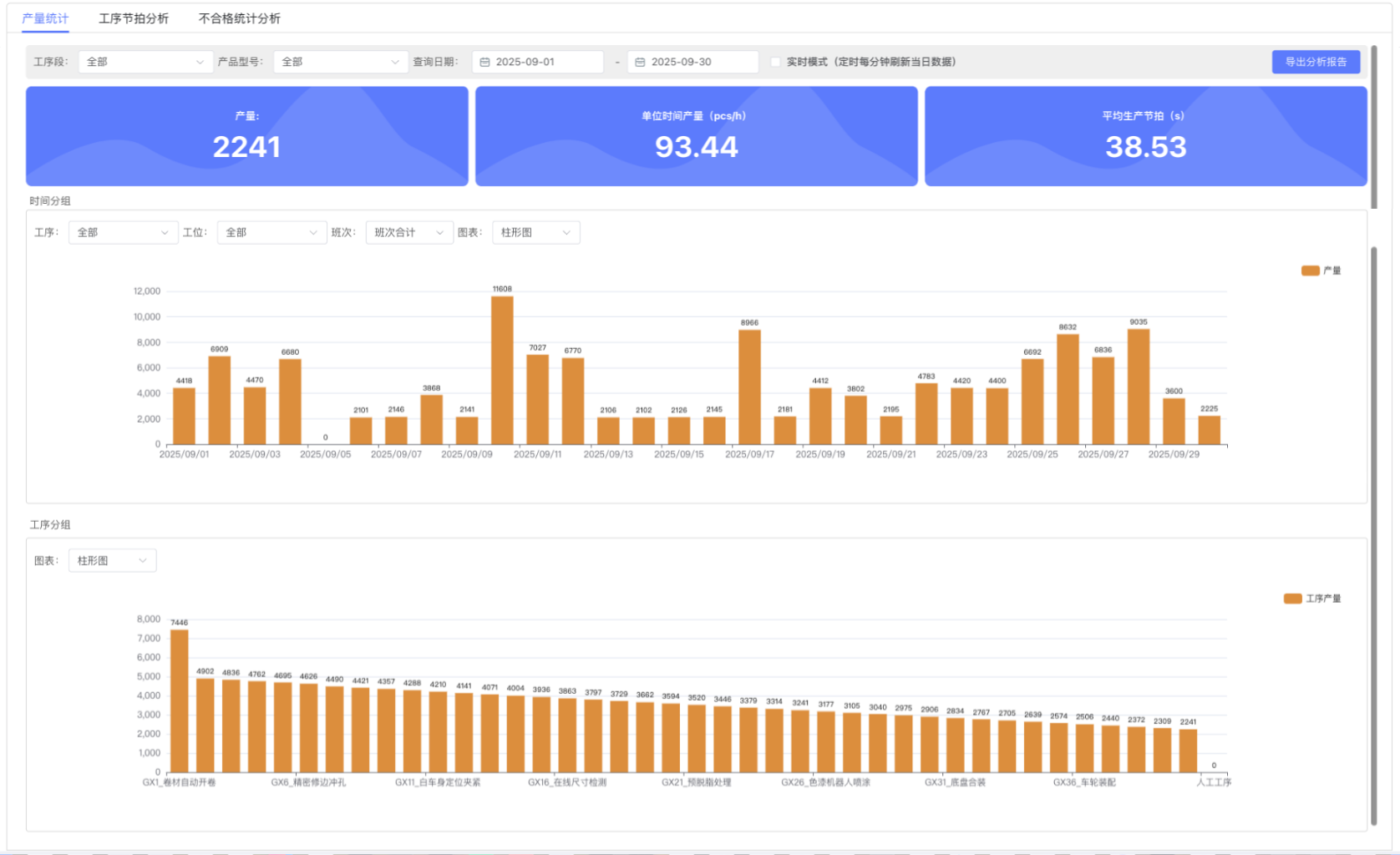
- Time Grouping: Displays the trend of output changes over time (days) in the form of a line chart or bar chart, helping to identify production peaks and troughs.
- Process Grouping: Compares the output of each process horizontally in the form of a bar chart, facilitating the discovery of processes with the highest or lowest output.
-
-
3.2 Process Beat Analysis
-
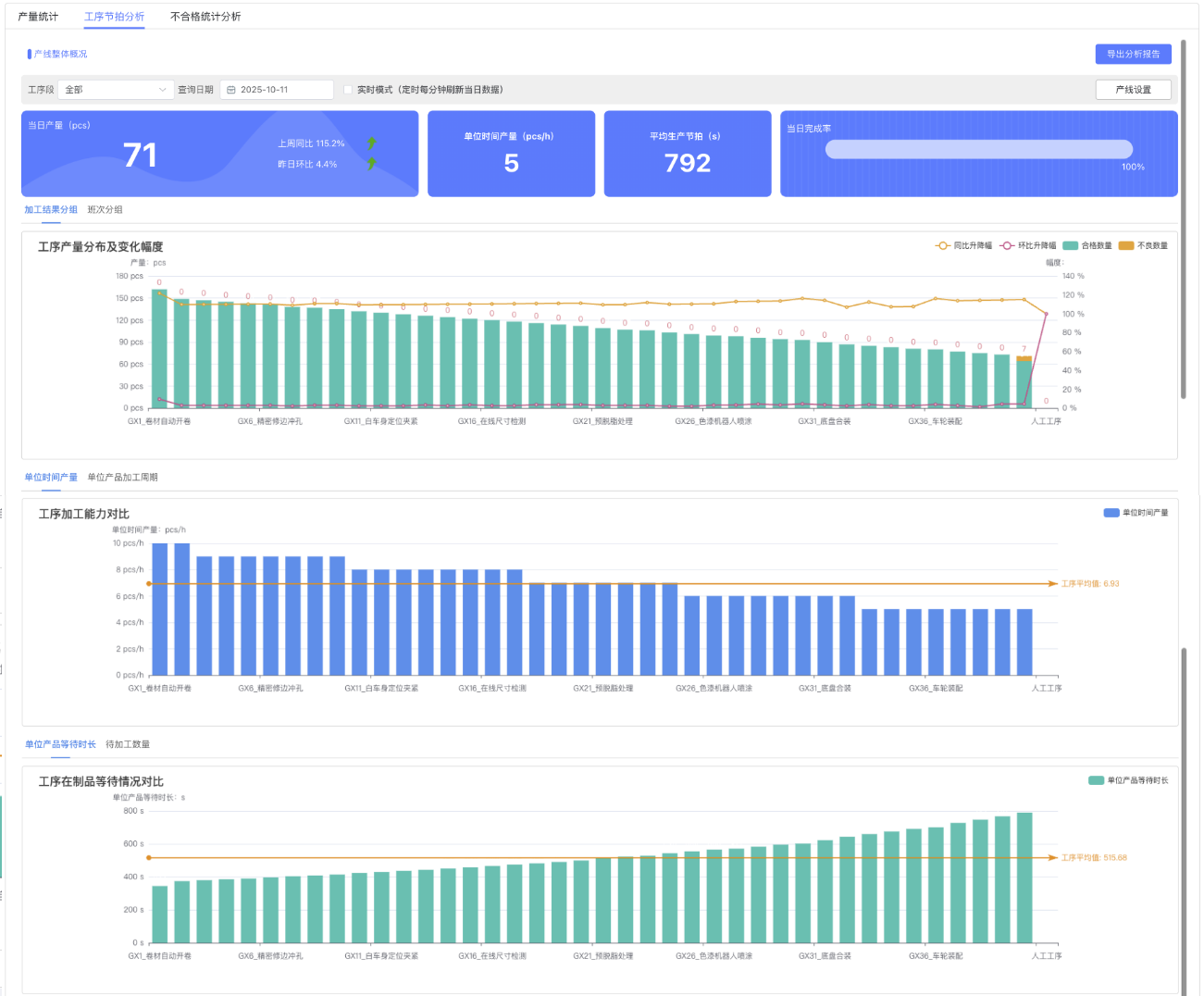
This page deeply analyzes the time efficiency and capacity performance of each process. In addition to displaying core indicators such as daily output and completion rate, it also contains the following key charts:
- Process Output Distribution and Variation Range: Assess the stability and fluctuation range of the output of each process.
- Unit Product Processing Cycle Comparison: Compare the "Actual Processing Cycle" of each process with the preset "Theoretical Processing Cycle" to intuitively expose timeout processes.
- Unit Product Waiting Time Comparison: Display the waiting time of products before entering each process, which is the key to identifying poor material flow or upstream process delivery delays.
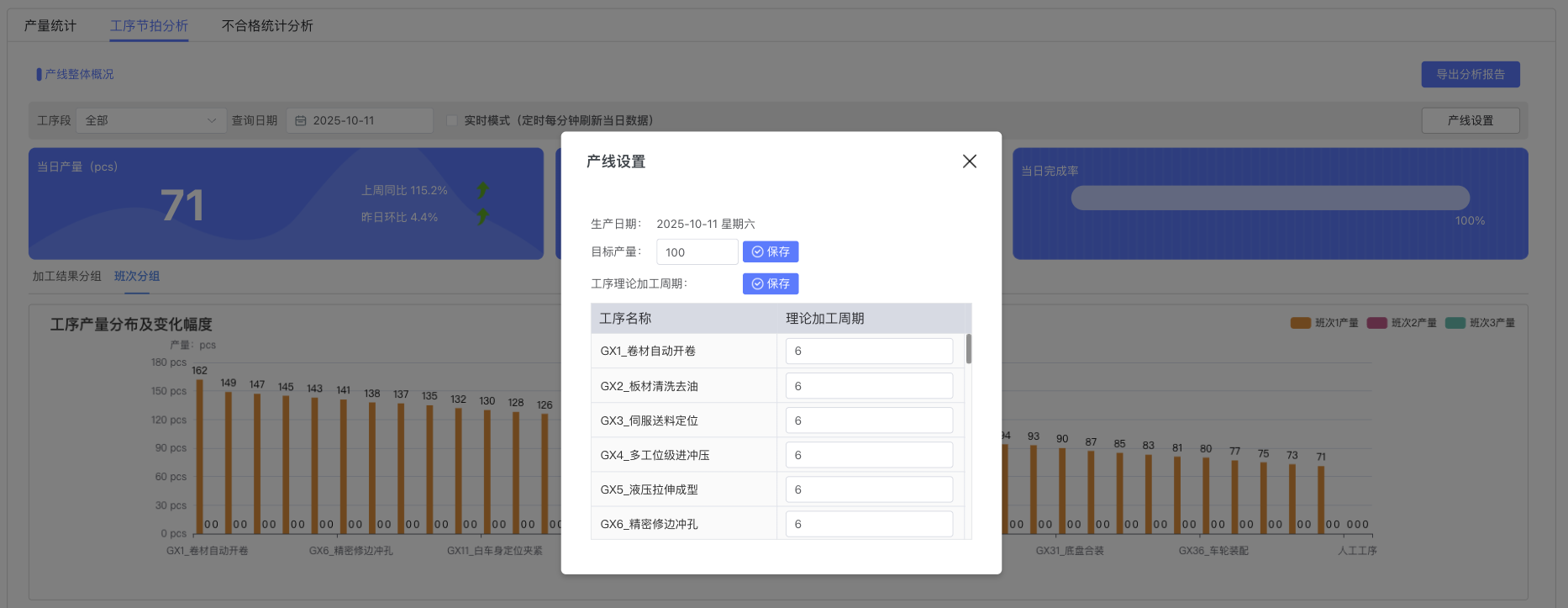
- Line Settings: Users can configure the target output of the production line and the theoretical processing cycle of each process through the "Line Settings" button to provide a baseline for analysis.
-
-
3.3 Process Detail Analysis
-
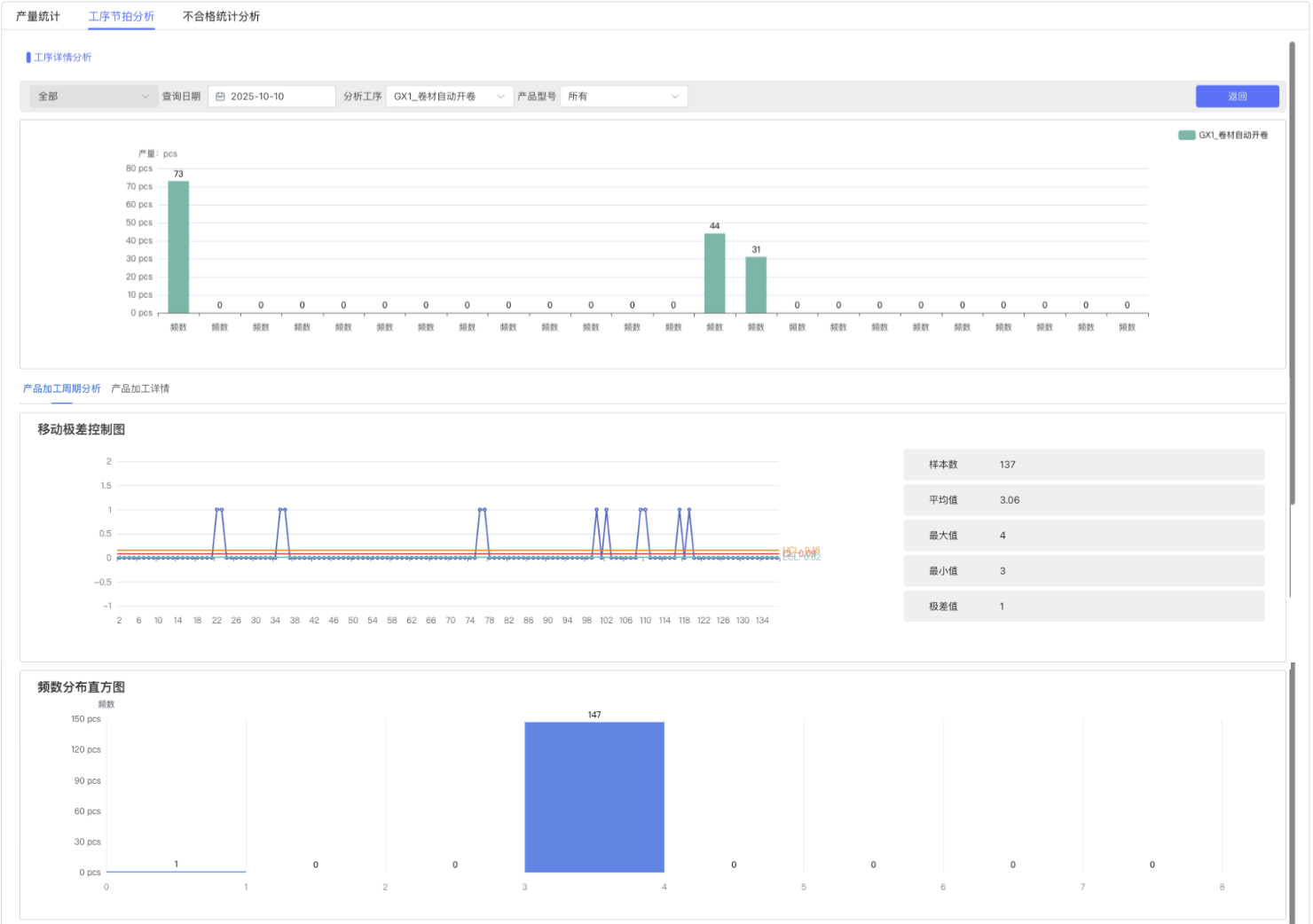
This is an analysis page for deep drilling into a single process. After selecting a specific process, users can view the detailed "Product Processing Cycle Details" list of that process, including the entry and exit time, processing result, and cycle of each product. At the same time, the system provides professional Statistical Process Control (SPC) charts:
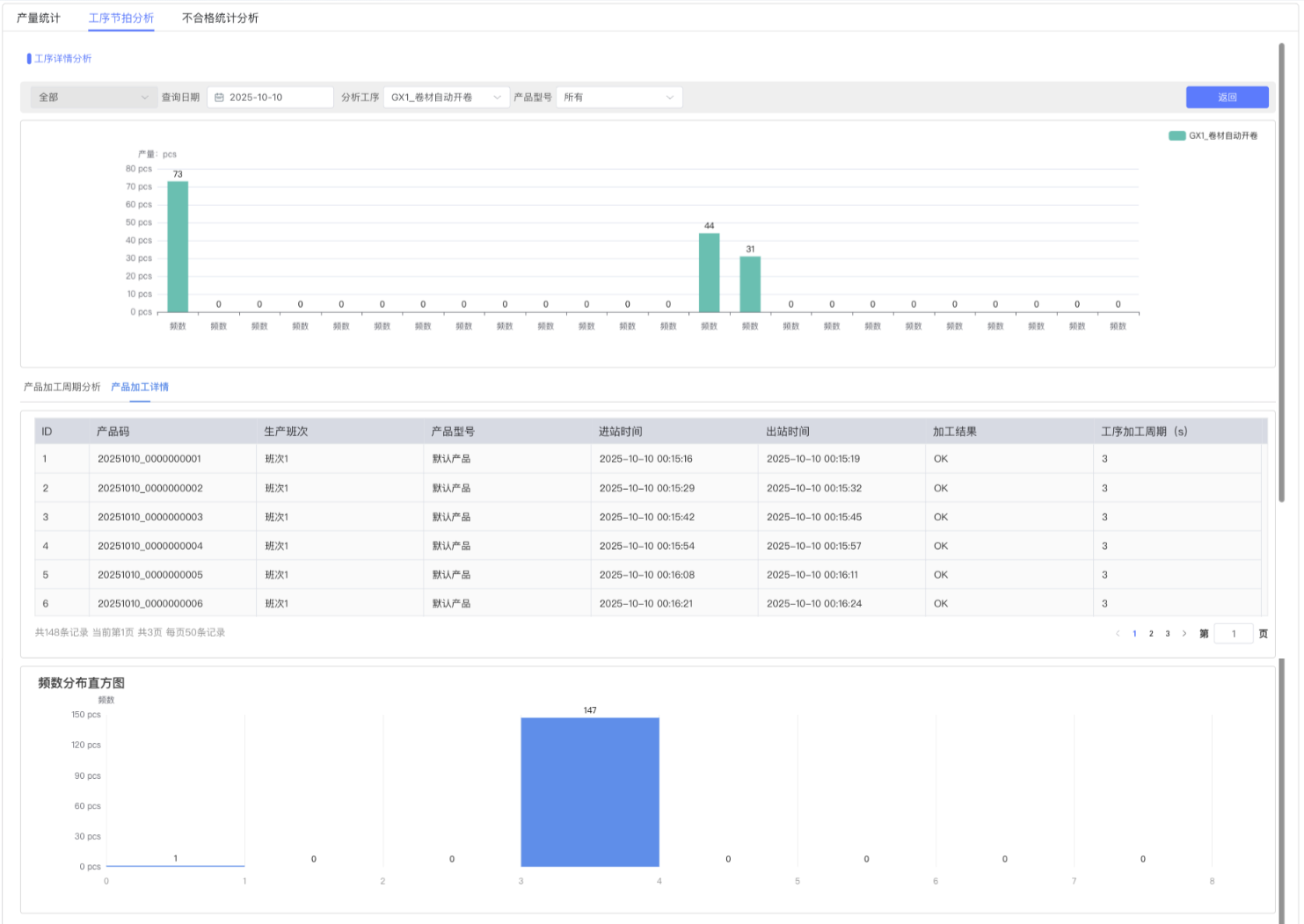
- Frequency Distribution Histogram: Displays the distribution of processing cycles.
- Moving Range Control Chart (XMR Chart): Monitors whether the process is stable and whether there are abnormal fluctuations by analyzing individual data points and their continuous changes (moving range).
- Product Processing Cycle Details List: Provides the most original and detailed single product processing records for data traceability and verification.
-
-
3.4 Non-conformance Statistical Analysis
-
This function focuses on the statistics and analysis of product quality. KPI cards display the core total number of non-conforming products and non-conformance rate. The charts below reveal the distribution of quality problems from different dimensions:
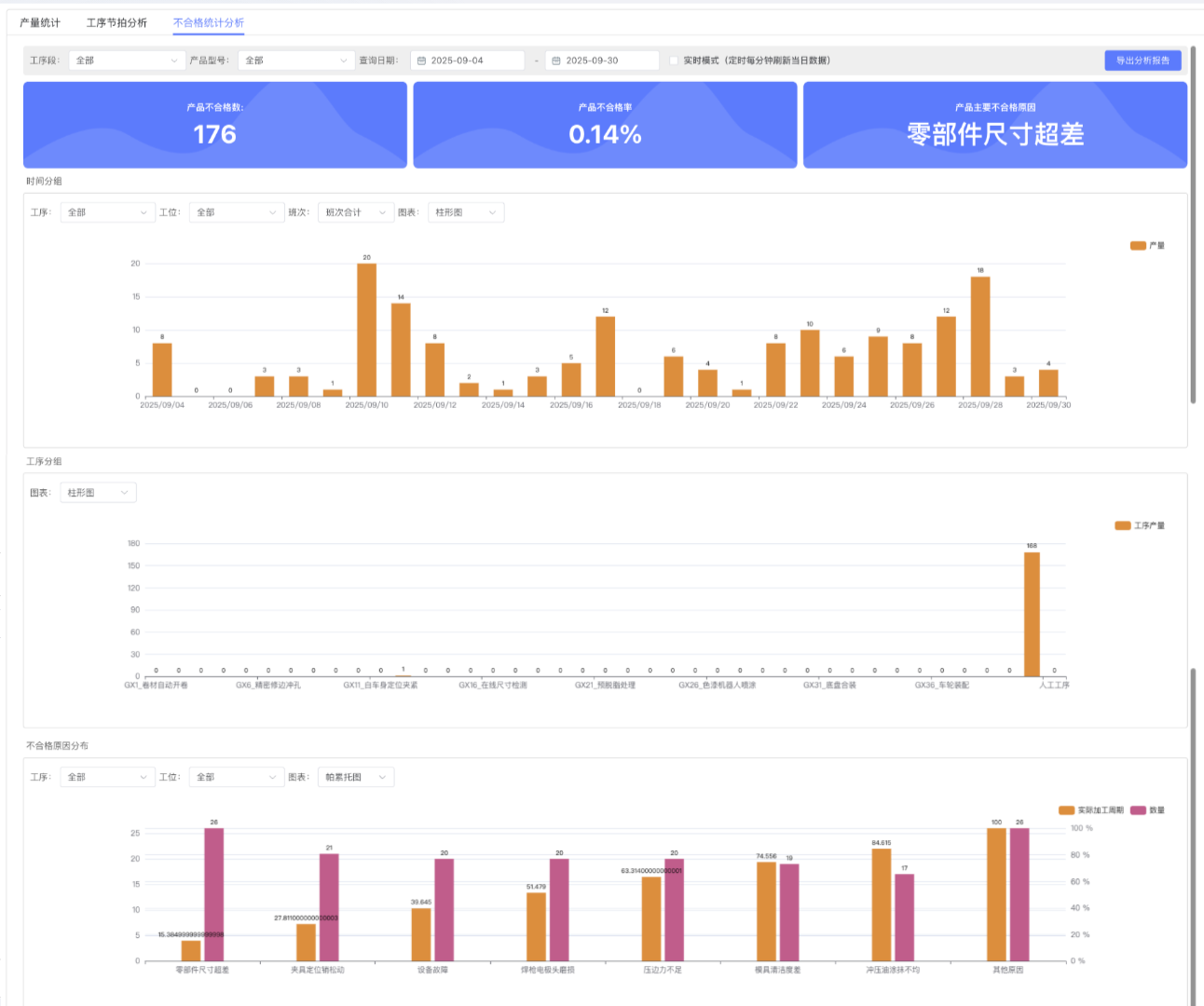
- Time/Process Grouping: Similar to output statistics, displaying the distribution of the number of non-conforming products over time or across processes.
- Non-conformance Reason Distribution: Uses a Pareto Chart to arrange non-conformance reasons from largest to smallest according to impact, helping the team focus on solving major quality problems (such as "part dimension out of tolerance").
-
4. Theoretical Basis
- Data Aggregation Model: The data analysis of this module is based on a hierarchical aggregation model. The system first collects minute-level finest-grained production data, and then aggregates it upwards into hour, shift, or day-level statistical data according to analysis needs. This design ensures analysis flexibility and high system performance.
- XMR Control Chart: The Individuals and Moving Range (XMR) control chart used in "Process Detail Analysis" is a powerful Statistical Process Control (SPC) tool. It is suitable for single continuous measurement data (such as "process processing cycle" in this module), judging whether a process is in a statistically stable state by calculating and monitoring data points themselves (I chart) and the difference between adjacent data points (MR chart).
5. Best Practices and Precautions
- Set Accurate Benchmarks: To ensure the effectiveness of "Process Beat Analysis", please be sure to maintain accurate and realistic "Theoretical Processing Cycles" in "Line Settings".
- Focus on Key Issues: Regularly view the Pareto chart in "Non-conformance Statistical Analysis" and prioritize investment of improvement resources in the top three non-conformance reasons to achieve the highest return on investment for quality improvement.
- Combine Data with Site: Bottleneck processes or abnormal fluctuations analyzed by charts should be verified in combination with actual observations at the production site to find the root cause of the problem.
- Note Data Range: Querying data over a long time span (such as more than one month) may cause the page to load slowly. It is recommended to perform monthly or weekly analysis for the best experience.
- Understand Real-time Mode: The "Real-time Mode" switch will cause the system to refresh data at a higher frequency, providing a near real-time monitoring view, but may increase server load. It is recommended to turn off this mode when performing historical review analysis.