Quality Analysis
1. Module Overview
1.1 Module Introduction
The Quality Analysis module is the core quality management plugin of the LMES manufacturing execution system. Based on SPC (Statistical Process Control), it combines various quality analysis methods to comprehensively monitor and analyze the production process. This module monitors the stability and capability of the production process through scientific statistical methods, helping enterprises realize the transformation of quality management from "post-inspection" to "pre-prevention".
- Component Identifier: SPCAnalysis
- Component Name: Quality Analysis
- Component Category: run (Plugin)
1.2 Core Value
- Real-time Monitoring: 24/7 real-time monitoring of production process quality status
- Prevention Oriented: Discover quality hazards in advance through statistical analysis
- Data Driven: Scientific decision support based on data
- Continuous Improvement: Support PDCA quality management cycle
- Compliance Management: Meet ISO 9001, TS16949 and other quality system requirements
1.3 Applicable Scenarios
- Manufacturing production process quality control
- Product key characteristic monitoring
- Supplier quality management
- Process parameter optimization
- Quality improvement project support
2. Quick Start
2.1 Basic Navigation
- Quality Data Overview: Overview of overall quality status
- Parameter SPC Analysis: Detailed statistical process control analysis
- Parameter Real-time CPK: Real-time process capability monitoring
3. Function Module Details
3.1 Quality Data Overview
3.1.0 Quality Parameter Settings
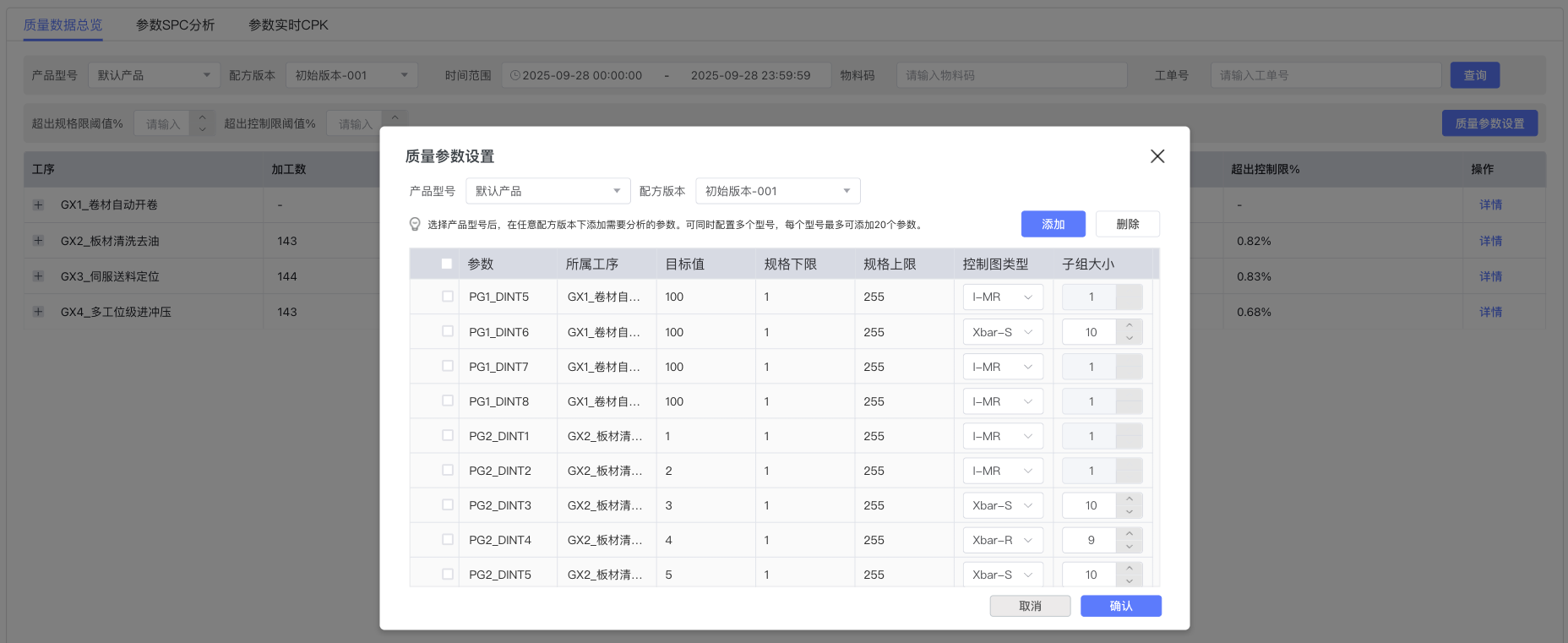
🔧 Parameter Configuration Management
Main Configuration Items
- Product Model: Select the product requiring parameter configuration
- Recipe Version: Select the corresponding recipe version
- Parameter List Configuration:
- Parameter: Measurement parameters such as PG1_DINT5, PG1_DINT6, PG2_DINT1, etc.
- Belonging Process: Process names such as GX1_Coil Automatic Uncoiling, GX2_Sheet Cleaning and Degreasing, etc.
- Target Value: Target value setting for the parameter
- Lower Specification Limit: Lower limit value of specification requirements
- Upper Specification Limit: Upper limit value of specification requirements
- Control Chart Type: Selection of control chart types such as I-MR, Xbar-S, Xbar-R
- Subgroup Size: Number of sample subgroups for statistical analysis
Operation Functions
- Add: Add new parameter configuration
- Delete: Delete selected parameter configuration
3.1.1 Function Description
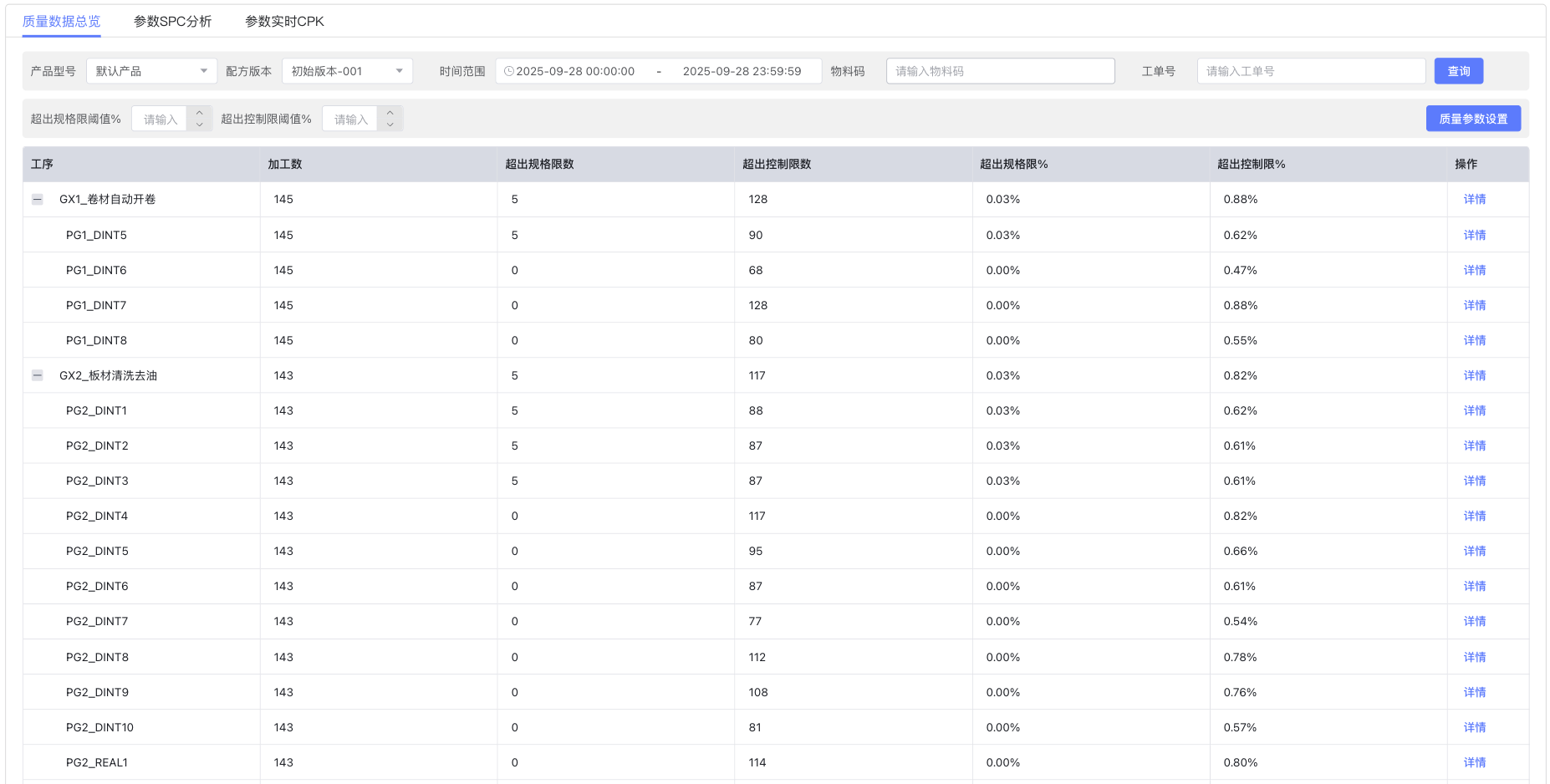
Quality Data Overview provides a "cockpit" view for enterprise quality management, displaying the overall quality status through Key Quality Indicators (KQI), helping managers quickly understand the production quality level.
3.1.2 Main Functional Features
📊 Quality Statistics Table
- Process Quality Summary: Statistics on processed quantity, quantity exceeding specification limits, and quantity exceeding control limits by process
- Quality Ratio Calculation: Automatically calculate the ratio exceeding specification limits and ratio exceeding control limits
- Layered Display: Display by process hierarchy, supporting detailed viewing at the parameter level
- Operation Function: Each row provides a "Details" link to jump to the SPC analysis interface of the specific parameter
3.1.3 Operation Steps
-
Set Query Conditions
Product Model: Select the product model to be analyzedRecipe Version: Select the corresponding recipe versionTime Range: Select start date and end dateMaterial Code: Enter material code for filteringProcess Number: Select the process number of interestExceed Spec Limit Threshold %: Set threshold for specification limit anomaliesExceed Control Limit Threshold %: Set threshold for control limit anomalies -
View Quality Overview
- Observe the processed quantity and quality status of each process
- Focus on processes with Exceed Spec Limit Ratio > 0.5%
- Monitor abnormal processes with Exceed Control Limit Ratio > 1%
-
In-depth Analysis
- Click the "Details" button to enter the SPC analysis of the specific process
- Use the export function to generate quality reports
3.2 Parameter SPC Analysis
Parameter SPC Analysis is the core functional module of the system, providing professional statistical process control analysis tools.
3.2.1 Control Chart Analysis
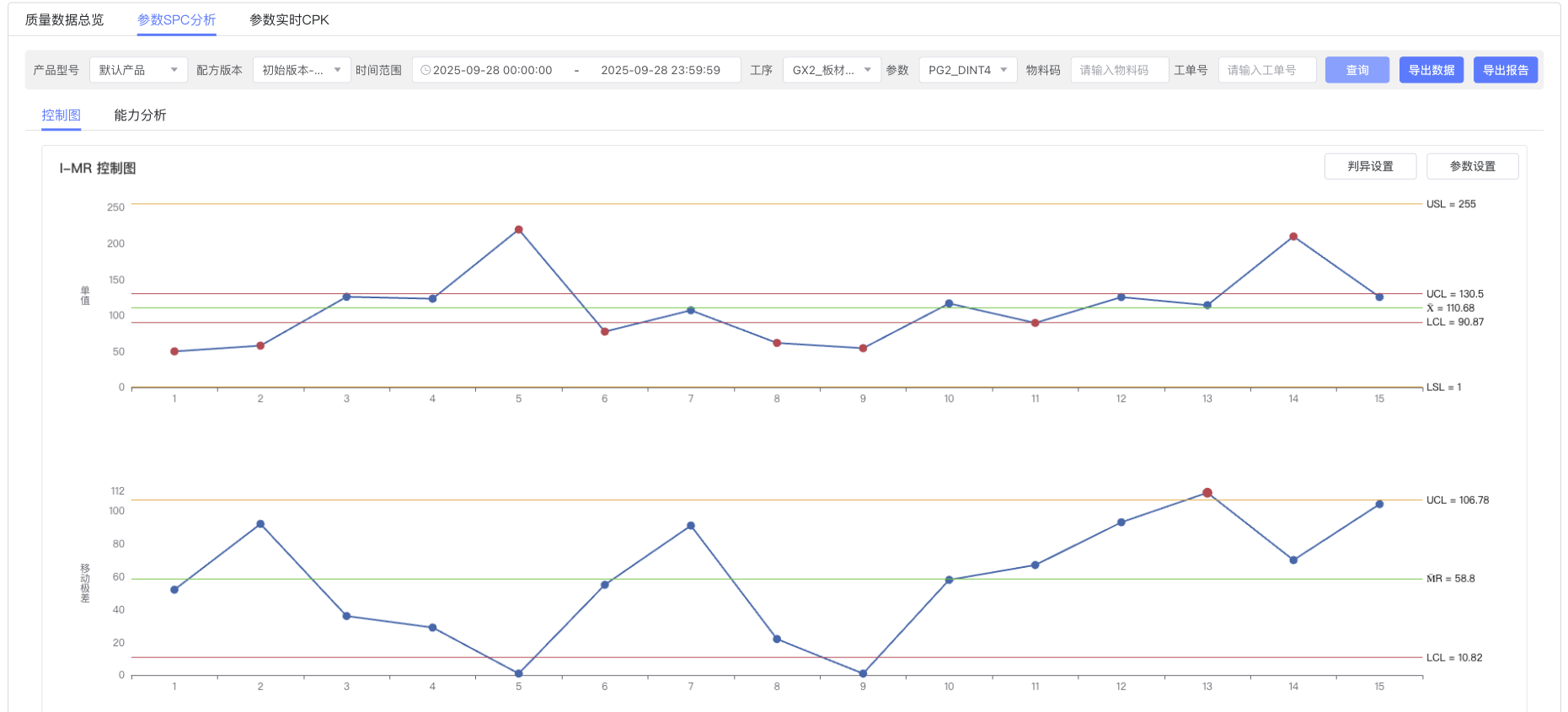
🎯 I-MR Control Chart Detailed Explanation
Control charts are the core tool of SPC, used to monitor process stability:
Upper Control Chart (Individual Chart - I Chart)
- Purpose: Monitor changes in individual measurement values
- Control Limit Calculation:
- Center Line (X̄) = Average of all measurement values
- Upper Control Limit (UCL) = X̄ + 2.66 × MR̄
- Lower Control Limit (LCL) = X̄ - 2.66 × MR̄
- Interpretation Points:
- Data points within control limits: Process is in control
- Data points outside control limits: Process is out of control, investigation required
Lower Control Chart (Moving Range Chart - MR Chart)
- Purpose: Monitor variability between adjacent measurement values
- Control Limit Calculation:
- Center Line = MR̄ (Average of Moving Ranges)
- Upper Control Limit = 3.267 × MR̄
- Lower Control Limit = 0 (Usually 0)
- Interpretation Meaning: Reflects short-term process variation
🔧 Control Chart Operation Functions
-
Control Chart Switching
- Control Chart/Capability Analysis tab switching
- I-MR Control Chart display (Upper Individual Chart, Lower Moving Range Chart)
-
Out-of-Control Rule Settings
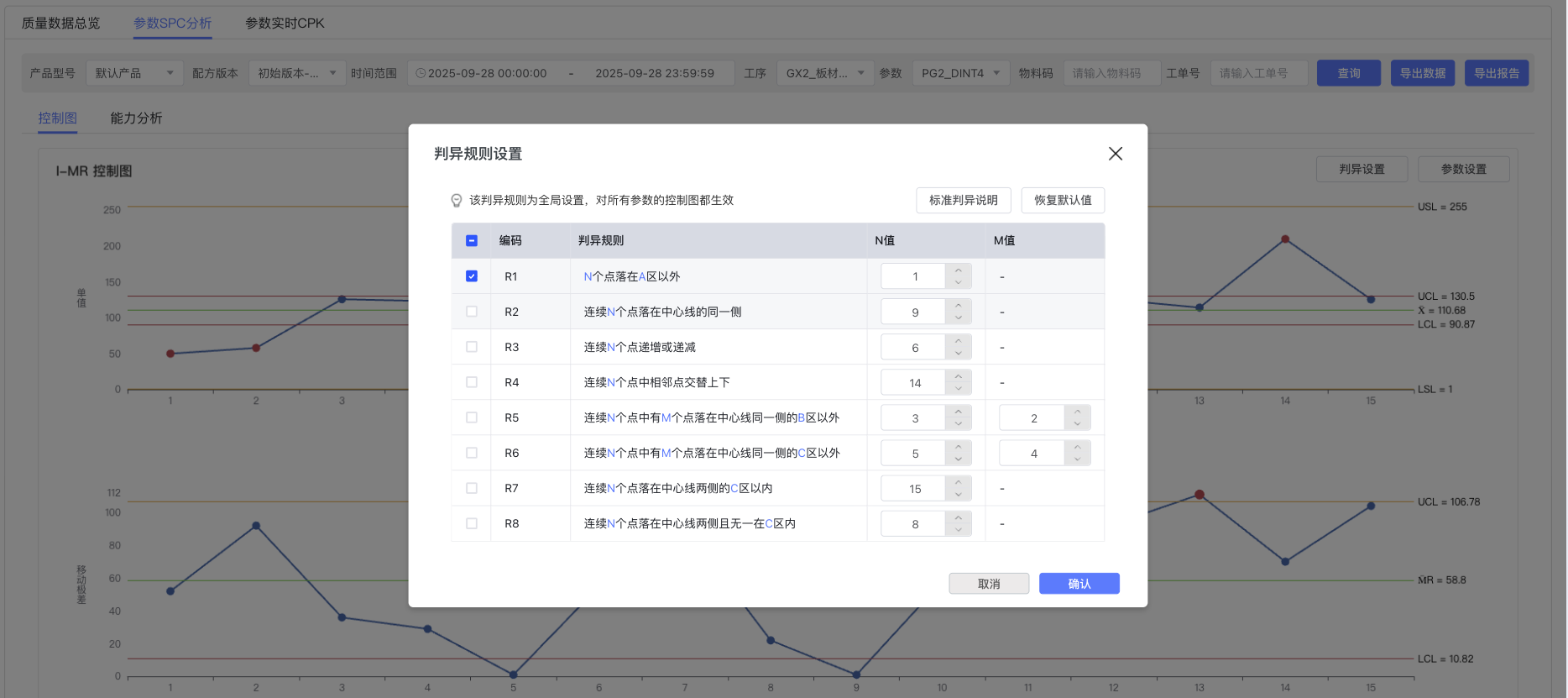
Configure Western Electric out-of-control rules via the "Out-of-Control Settings" button:
| Rule No. | Condition | N Value | M Value | Application Scenario |
|---|---|---|---|---|
| R1 | N points fall outside control limits | 1 | - | Process out of control detection |
| R2 | N consecutive points fall on the same side of the center line | 9 | - | Process shift detection |
| R3 | N consecutive points are increasing or decreasing | 6 | - | Trend change detection |
| R4 | Adjacent points alternate up and down in N consecutive points | 14 | - | Systematic variation |
| R5 | M out of N points are outside 2σ on the same side | 3 | 2 | Process instability |
| R6 | M out of N points are outside 1σ on the same side | 5 | 4 | Variation increase detection |
| R7 | N consecutive points fall within 1σ on both sides of center line | 15 | - | Variation abnormally small |
| R8 | None of N points are within 1σ near center line | 8 | - | Stratification detection |
-
Parameter Settings
- Control limit coefficient adjustment and display parameter configuration
- Right side displays control limit values (UCL, X̄, LCL, etc.)
-
Interactive Operations
- Abnormal points are marked in red (automatically identified based on out-of-control rules)
- Hover to display data details
- Support data export and report generation functions
3.2.2 Process Capability Analysis
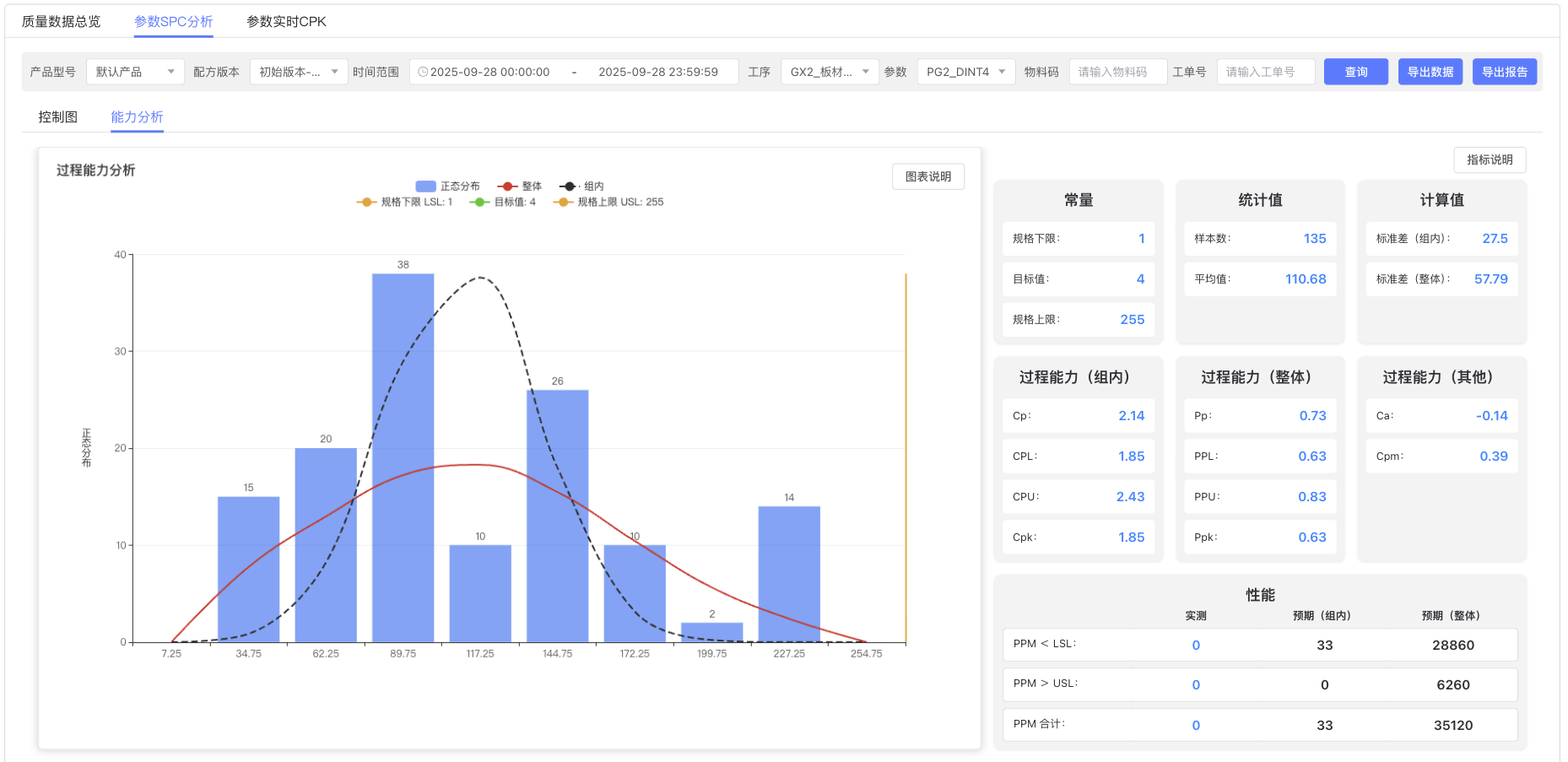
📊 Capability Analysis Component
Process capability analysis evaluates the ability of the production process to meet specification requirements:
Histogram Analysis
- Data Distribution Visualization: Intuitively display the distribution shape of measurement data
- Normality Test: Assess data normality by superimposing a normal curve
- Specification Limit Indication: Clearly mark upper and lower specification limit positions
Capability Index Calculation and Interpretation
| Index Type | Formula | Application Scenario | Criteria |
|---|---|---|---|
| Cp | (USL-LSL)/(6σ) | Process Potential Capability | ≥1.67 Excellent, ≥1.33 Good |
| Cpk | min(CPU,CPL) | Process Actual Capability | ≥1.67 Excellent, ≥1.33 Good |
| CPU | (USL-X̄)/(3σ) | Upper Specification Capability | ≥1.0 Qualified |
| CPL | (X̄-LSL)/(3σ) | Lower Specification Capability | ≥1.0 Qualified |
| Pp | (USL-LSL)/(6S) | Process Overall Performance | ≥1.67 Excellent |
| Ppk | min(PPU,PPL) | Process Actual Performance | ≥1.67 Excellent |
Statistical Information Panel
- Constant Statistics:
- Lower Specification Limit, Target Value, Upper Specification Limit
- Sample Quantity, Average, Standard Deviation
- Process Capability Indices:
- Within-group Capability: Cp, CPL, CPU, Cpk
- Overall Capability: Pp, PPL, PPU, Ppk
- Other Indices: Ca (Offset Coefficient), Cpm (Target Capability Index)
- Performance Statistics:
- PPM Statistics: Expected non-conforming rate (Parts Per Million)
- Measured Statistics: Actual non-conforming product statistics
3.3 Parameter Real-time CPK Monitoring
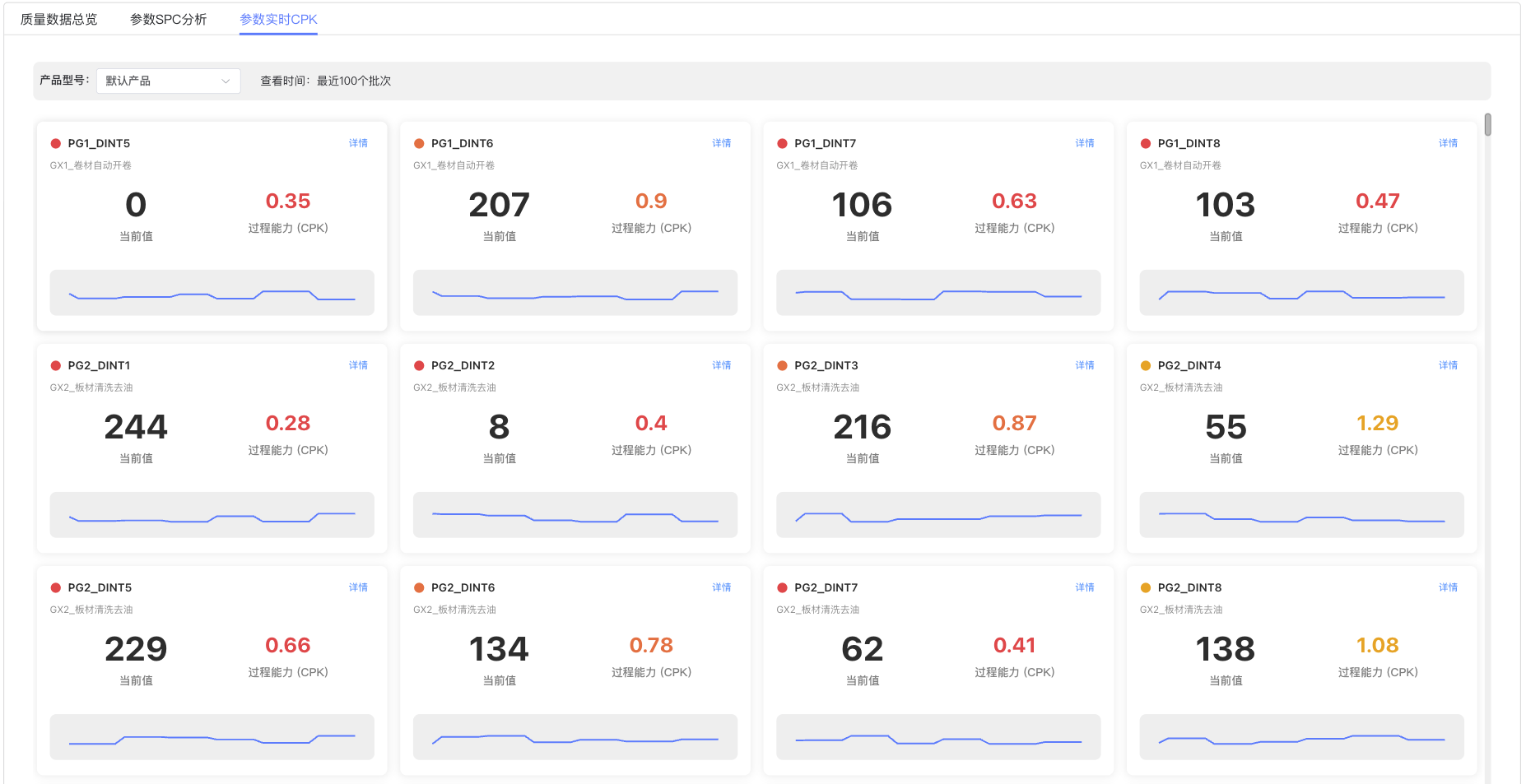
3.3.1 Real-time Monitoring Panel
📱 CPK Card Display Each parameter is displayed as an independent card:
- Parameter Identifier: Parameter codes like PG1_DINT5, PG1_DINT6, PG2_DINT1
- Process Description: Process names like GX1_Coil Automatic Uncoiling, GX2_Sheet Cleaning and Degreasing
- Current Value: Displays the latest measurement value of the parameter (e.g., 244, 8, 216)
- CPK Value: Real-time calculated process capability index (Red displays CPK values below threshold)
- Status Indicator: Red dot indicates attention needed, orange dot indicates good
- Trend Chart: Small trend line chart of CPK change at the bottom of each card
- Details Link: "Details" link provided in the upper right corner of each card
3.3.2 CPK Grade Classification System
| Grade | CPK Range | Color Identifier | Quality Level | Suggested Action |
|---|---|---|---|---|
| Grade A | CPK ≥ 1.33 | 🟠 Orange | Good | Maintain status quo, continuous monitoring |
| Grade B | 1.00 ≤ CPK < 1.33 | 🟠 Orange | Acceptable | Strengthen monitoring, look for improvement opportunities |
| Grade C | CPK < 1.00 | 🔴 Red | Attention Needed | Analyze causes, formulate improvement plan |
| Grade D | CPK < 0.67 | 🔴 Red | Improvement Needed | Immediate stop for investigation, urgent improvement |
3.3.3 Real-time Warning Mechanism
Automatic Warning Conditions
- CPK value lower than set threshold (usually 1.33)
- CPK value shows continuous downward trend
- Single measurement value exceeds specification limit
- Process shows out-of-control signal
Warning Response Process
- System automatically sends warning signal
- Relevant personnel receive warning notification
- Rapid response and problem investigation
- Take corrective measures
- Effect verification and recording
4. Operation Guide
4.1 Quality Parameter Setting Operation
Based on the Effect Diagram - Quality Parameter Settings interface, main operations include:
Parameter Configuration Steps
- Select product model and recipe version
- Configure values in the parameter list:
- Set target value, lower specification limit, upper specification limit
- Select control chart type (I-MR, Xbar-S, Xbar-R)
- Set subgroup size
- Use "Add" button to add new parameters
- Use "Delete" button to remove unwanted parameters
- Click "Confirm" to save configuration
4.2 Out-of-Control Rule Setting Operation
Based on the Effect Diagram - Out-of-Control Rule Settings interface, main operations include:
Out-of-Control Rule Configuration Steps
- Click "Out-of-Control Settings" button in SPC analysis interface
- In the popped-up settings window:
- Check the rules to be enabled (R1-R8)
- Adjust N value and M value parameters
- Click "Confirm" to apply settings
- System will automatically mark abnormal points in red on the control chart
5. SPC Theoretical Basis
5.1 Statistical Process Control Core Concepts
5.1.1 Two Types of Variation
Common Cause Variation
- Characteristics: Random, inevitable, predictable
- Sources: Natural variation of raw materials, environmental condition changes, normal wear of equipment
- Management Mode: Reduce through systematic improvement, such as process optimization, equipment upgrade
Special Cause Variation
- Characteristics: Non-random, identifiable, unpredictable
- Sources: Equipment failure, operation error, raw material anomaly, sudden environmental change
- Management Mode: Identify and eliminate in time, restore process stability
5.1.2 Process Status Classification
| Process Status | Variation Type | Control Chart Performance | Management Focus |
|---|---|---|---|
| Ideal Status | Only common causes | Data points randomly distributed within control limits | Maintain status quo |
| Out of Control | Existence of special causes | Data points exceed control limits or show patterns | Find and eliminate special causes |
| Over-adjustment | Artificially introduced variation | Data points show over-correction patterns | Reduce unnecessary adjustments |
5.2 Control Chart Statistical Principles
5.2.1 3σ Principle
Theoretical Basis
- Under normal distribution, 99.73% of data falls within the range of μ±3σ
- Control Limit Setting: UCL = μ + 3σ, LCL = μ - 3σ
- Misjudgment Probability: α = 0.27% (False Positive Rate)
Correction in Practical Application
I-MR Control Chart Control Limit Coefficients:
- I Chart: ±2.66 × MR̄ (Equivalent to 3σ)
- MR Chart: 3.267 × MR̄
- Correction Reason: Distribution characteristics of moving range
5.2.2 ARL (Average Run Length)
Meaning of ARL
- ARL₀: Average run length when process is in control ≈ 370
- ARL₁: Average run length when process is out of control, smaller is better
- Goal: Quickly detect out-of-control status while ensuring low misjudgment rate
5.3 Process Capability Theory
5.3.1 6σ Quality Management
6σ Level Correspondence
| σ Level | CPK Value | Non-conforming Rate (PPM) | Quality Grade |
|---|---|---|---|
| 6σ | 2.0 | 3.4 | World Class |
| 5σ | 1.67 | 233 | Excellent |
| 4σ | 1.33 | 6,210 | Good |
| 3σ | 1.0 | 66,807 | Average |
| 2σ | 0.67 | 308,538 | Poor |
5.3.2 Statistical Properties of Capability Indices
Confidence Interval of Cpk
(1-α) Confidence Interval of Cpk:
Lower Limit = Cpk × √[(n-1)/χ²(α/2,n-1)]
Upper Limit = Cpk × √[(n-1)/χ²(1-α/2,n-1)]

Where: n is sample size, χ² is Chi-square distribution
6. Best Practices and Precautions
6.1 Data Quality Management
6.1.1 Measurement System Analysis (MSA)
Gage R&R Requirements
- Excellent: %R&R < 10%
- Acceptable: 10% ≤ %R&R < 30%
- Unacceptable: %R&R ≥ 30%
Regular Calibration Plan
Measurement Equipment Calibration Frequency:
- Key Measurement Equipment: Monthly calibration
- General Measurement Equipment: Quarterly calibration
- Reference Standards: Annual external calibration
6.1.2 Data Collection Standards
Sampling Strategy
- Subgroup Size: Usually n=1 (Continuous Production) or n=4-5 (Batch Production)
- Sampling Frequency: Determined by production beat, recommended hourly or per batch
- Sampling Position: Representative position, avoiding boundary effects
Data Recording Requirements
- Real-time recording, avoid retrospective entry
- Record key information such as sampling time, operator, equipment status
- Abnormal data must indicate reasons and handling measures
7. Appendix
7.1 Glossary
| Term | English | Definition | Application |
|---|---|---|---|
| Statistical Process Control | SPC | Technique of using statistical methods to monitor and control processes | Core tool of quality management |
| Control Chart | Control Chart | Statistical chart used to monitor process stability | Main tool for process monitoring |
| Process Capability | Process Capability | Ability of the process to meet specification requirements | Important indicator for process evaluation |
| Control Limits | Control Limits | Process variation boundaries determined based on statistical principles | Standard for judging process status |
| Specification Limits | Specification Limits | Technical requirements that products or services must meet | Quality standard definition |
| Moving Range | Moving Range | Absolute difference between adjacent measurement values | Component of I-MR control chart |
7.2 Common Formulas
7.2.1 Control Limit Calculation
I-MR Control Chart:
- I Chart Center Line: X̄ = (X₁ + X₂ + ... + Xₙ) / n
- I Chart Control Limits: UCL_I = X̄ + 2.66×MR̄, LCL_I = X̄ - 2.66×MR̄
- MR Chart Center Line: MR̄ = (MR₁ + MR₂ + ... + MRₙ₋₁) / (n-1)
- MR Chart Control Limits: UCL_MR = 3.267×MR̄, LCL_MR = 0

X̄-R Control Chart:
- X̄ Chart Control Limits: UCL_X̄ = X̄ + A₂×R̄, LCL_X̄ = X̄ - A₂×R̄
- R Chart Control Limits: UCL_R = D₄×R̄, LCL_R = D₃×R̄
7.2.2 Process Capability Indices
Basic Capability Indices:
- Cp = (USL - LSL) / (6σ̂)
- Cpk = min[(USL - X̄)/(3σ̂), (X̄ - LSL)/(3σ̂)]

Performance Indices:
- Pp = (USL - LSL) / (6S)
- Ppk = min[(USL - X̄)/(3S), (X̄ - LSL)/(3S)]

Other Indices:
- Ca = |X̄ - T| / [(USL - LSL)/2]  (Offset Coefficient)
- Cpm = (USL - LSL) / [6√(σ² + (X̄ - T)²)]  (Target Capability Index)
7.3 Reference Materials
Standard Documents
- GB/T 4091-2001 "Control Charts"
- GB/T 17989.1-2020 "Control Charts Part 1: General Guidelines"
- ISO 7870-2:2013 "Control charts — Part 2: Shewhart control charts"