Material Management
1. Module Overview
Core Function: Material Management is one of the core modules in the Manufacturing Execution System (MES), used to define, track, and manage all material information required in the production process. It ensures the consistency and accuracy of material data and is the basis for material traceability, cost accounting, and inventory management.
- Component Identifier: MaterialManagement
- Component Name: Material Management
- Component Category: run (plugin)
2. Scenario Description
- In a manufacturing environment, this module is used when it is necessary to standardize definitions for raw materials, semi-finished products, finished products, etc., establish unique material codes, manage material batches or serial numbers, and record their consumption and flow during production. For example, before a new product goes online, all materials involved in its BOM (Bill of Materials) need to be defined first; or when tracing a problematic batch, it is necessary to query the usage records of that batch of materials.
3. Function Introduction
Interface Overview
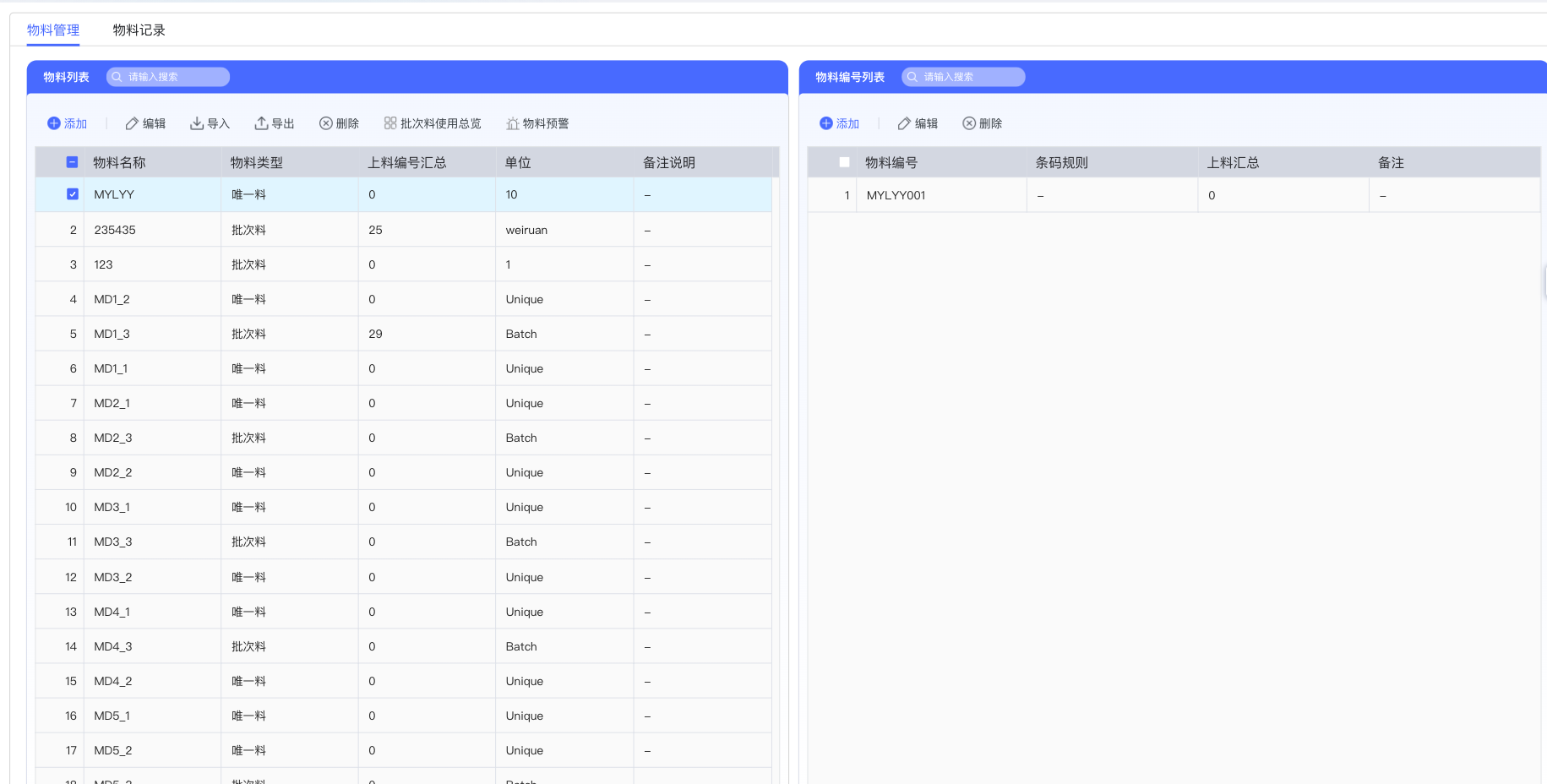
The Material Management module mainly consists of two functional pages: "Material Management" and "Material Records". By default, it enters the "Material Management" page, which is divided into two areas: "Material List" and "Material Number List", used to manage materials themselves and material instances (numbers).
3.1 Material List Management
The material list area is used to create and maintain basic information about materials.
-
Interface Functions
- Search Box: Located at the top, the "Please enter keyword" search box allows quick retrieval of materials.
- Add: Click the "Add" button to pop up the "New Material" dialog box.
- Edit: After selecting a material in the list, click the "Edit" button to modify the material information.
- Import/Export: "Import" and "Export" functions support batch processing of material data.
- Delete: After selecting one or more materials, click the "Delete" button to remove them.
- Batch Material Usage Overview: Click the "Batch Material Usage Overview" button to view and manage the usage of batch-type materials at specific stations.
- Material Warning: Click the "Material Warning" button to set warning quantities for material consumption in different processes.
- List Fields: The list displays "Material Name", "Material Type", "Loading Summary Count", "Unit", and "Remarks".
-
New Material
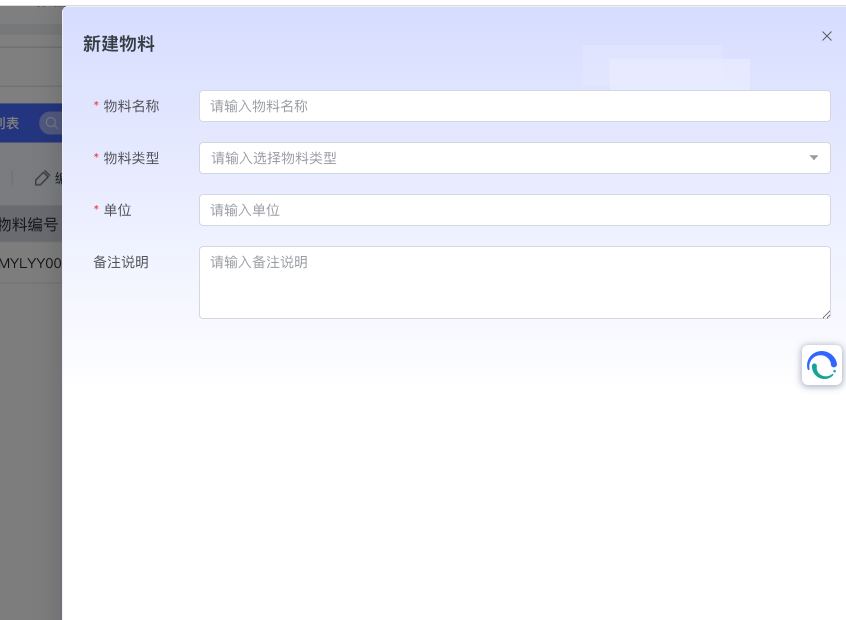
- After clicking the "Add" button, the system will pop up the "New Material" dialog box.
- In this dialog box, you need to fill in "Material Name" (Required), "Material Type" (Required, dropdown selection), "Unit" (Required), and "Remarks". After filling in, click "Confirm" to create.
3.2 Material Number List Management
When a specific material is selected in the "Material List" on the left, the "Material Number List" on the right will display all material number instances associated with that material.
-
Interface Functions
- Add: Click the "Add" button to create a new material number for the selected material.
- Edit/Delete: Support "Edit" and "Delete" operations for existing material numbers.
- List Fields: The list displays "Material Number", "Barcode Rule", "Loading Summary", and "Remarks".
-
New Material Number
-
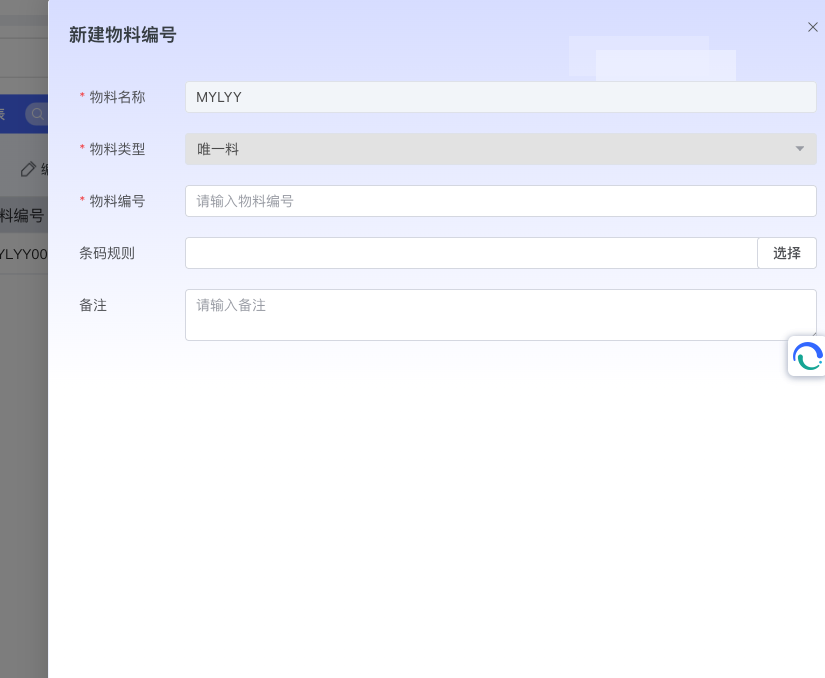
After clicking the "Add" button, the "New Material Number" dialog box pops up.
-
The system automatically brings in "Material Name" and "Material Type". The user needs to enter "Material Number" and can select a "Barcode Rule".
-
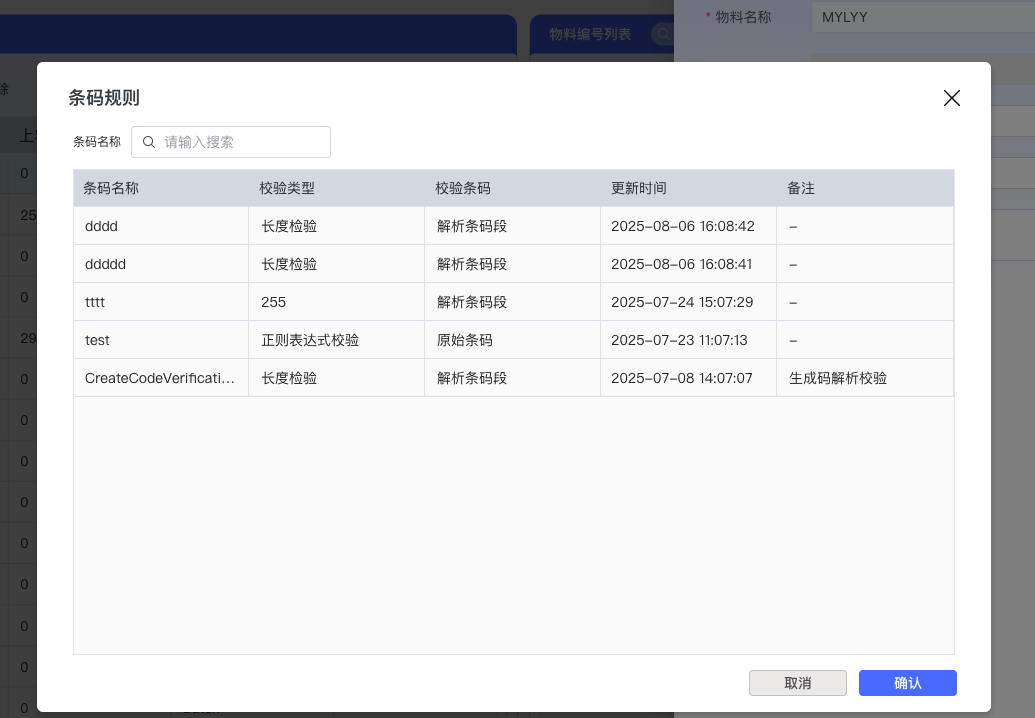
Click the "Select" button to the right of the "Barcode Rule" field to pop up a "Barcode Rule" list for the user to select.
-
3.3 Batch Material Usage Overview
This function is used to manage the consumption and issuance of "Batch Materials" at specific stations.
- Operation Process
-
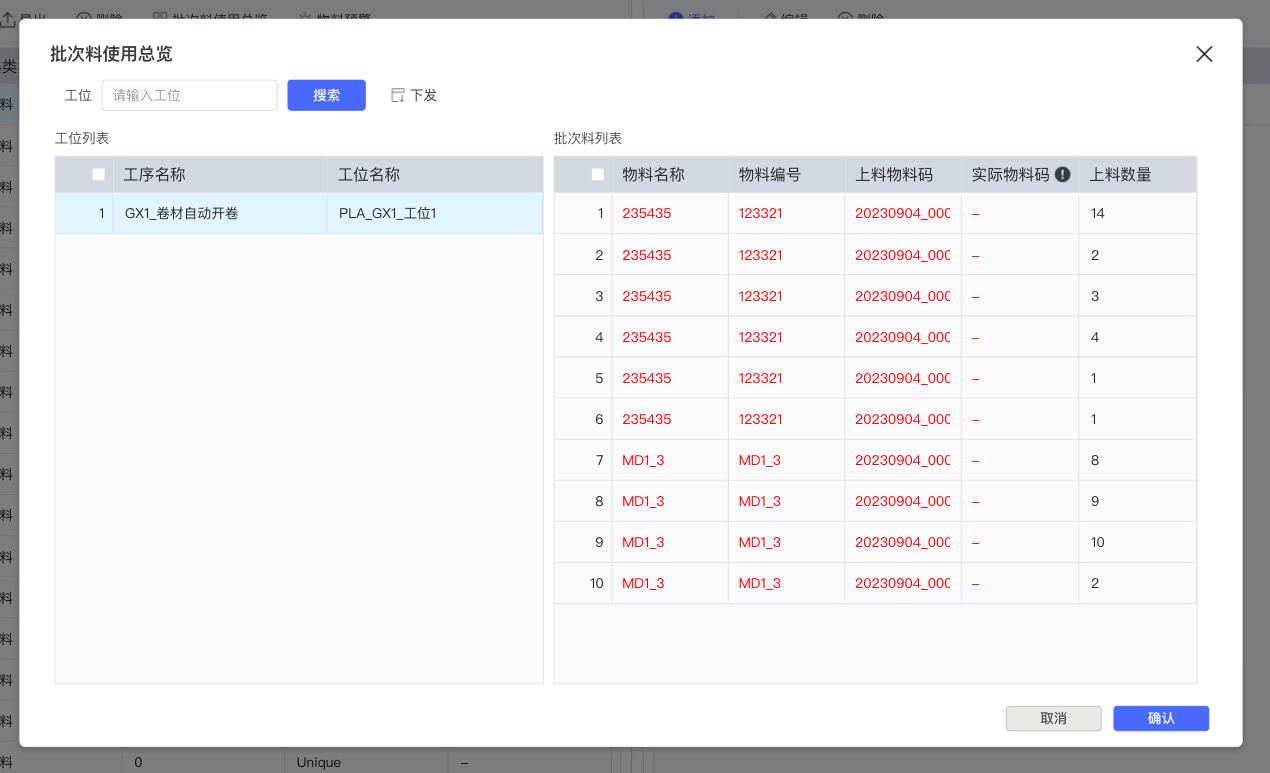
Select a "Batch Material" type material in the "Material List", then click the "Batch Material Usage Overview" button.
-
In the popped-up "Batch Material Usage Overview" dialog box, you first need to select a "Station". You can find it by entering the station name and clicking "Search".
-
After selecting the station, the "Batch Material List" on the right will display the information of the batch material already loaded on the current station.
-
Check the batch materials that need to be issued, then click the "Issue" button.
-
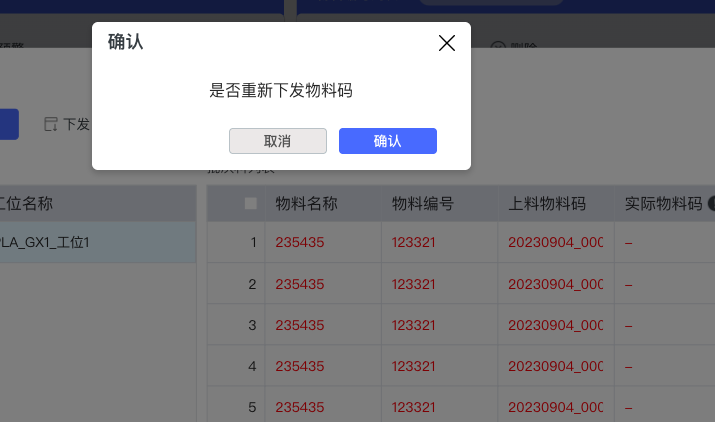
The system will pop up a confirmation dialog box prompting "Whether to reissue material code". Click "Confirm" to complete the issuance operation.
-
3.4 Material Warning
This function can set warnings for the usage quantity of materials in different processes to facilitate timely replenishment.
- Operation Process
-
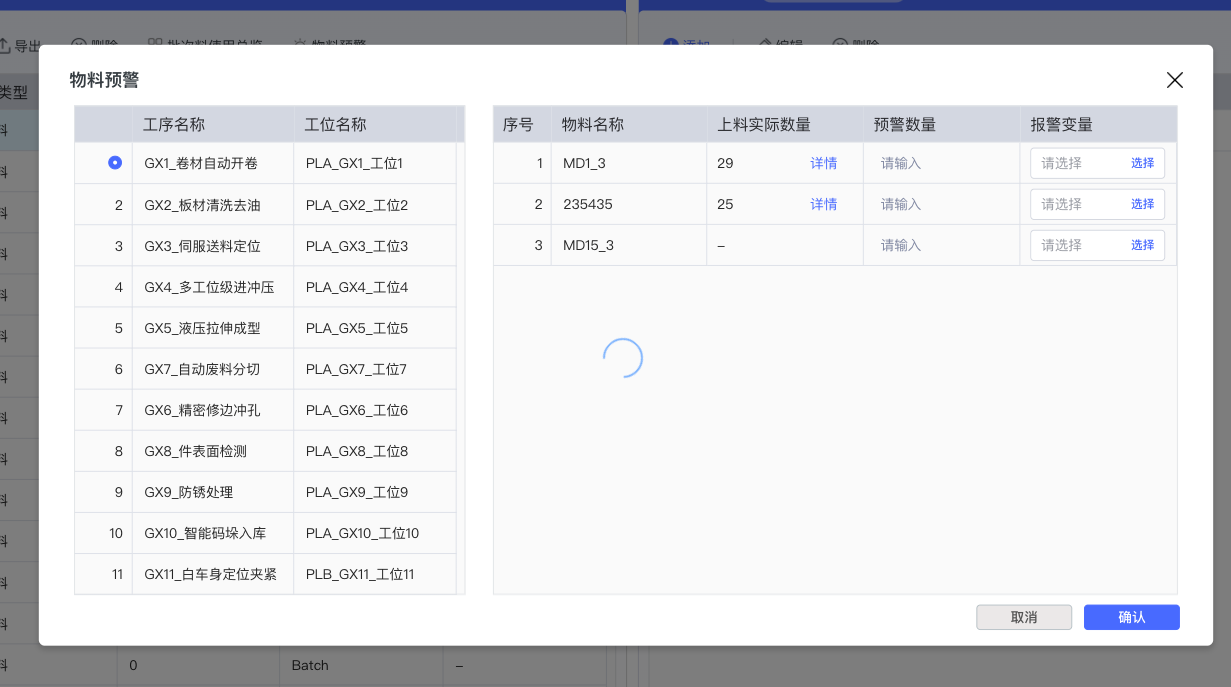
Select a material in the "Material List" and click the "Material Warning" button.
-
In the popped-up "Material Warning" dialog box, the left side is the "Process List".
-
The right list displays the associated material information. You can set "Warning Quantity" and "Alarm Variable" for each material. Click "Select" to associate a system variable for alarm.
-
3.5 Material Records
This page is used to query and trace the operation history of all materials.
- Interface Functions
-
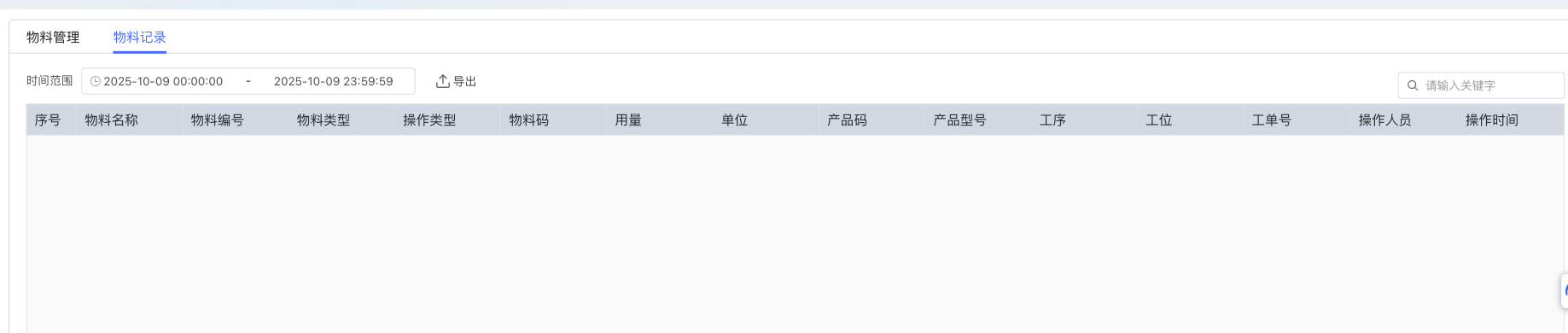
Time Range: You can filter records within a specific time period by setting "Time Range".
-
Export: Support "Export" of current query results as a file.
-
Search Box: Global search based on "Keyword".
-
List Fields: Detailed records of "Material Name", "Material Number", "Material Type", "Operation Type", "Material Code", "Usage", "Unit", "Product Code", "Product Model", "Process", "Station", "Work Order No.", "Operator", and "Operation Time", providing a complete traceability chain.
-
5. Best Practices and Precautions
- Unified Material Coding: It is recommended that enterprises establish a unified material coding specification internally and make good use of the "Material Number" function to ensure that each material instance has a unique identifier.
- Make Good Use of Material Types: "Unique Material" and "Batch Material" are two core material management modes. Please set accurately according to the actual management needs of the material (e.g., whether it is necessary to trace to a single product or a batch).
- Configure Material Warning: For key materials and consumables, it is recommended to configure "Material Warning" on the corresponding process to avoid production interruption caused by material shortage.
- Regularly Review Records: "Material Records" are an important data source for quality traceability and cost analysis. It is recommended to review regularly to ensure data accuracy and integrity.