Process Management
1. Module Overview
Core Function: The Process Management module is the core component for digital modeling of production lines in the LMES system. It contains two sub-functional modules: Process List and Station List, mainly completing the definition and configuration of production line sections, processes, and stations.
-
Component Identifier: ProcessManagement
-
Component Name: Process Management
-
Component Category: run (plugin)
-
User Value: This module realizes the digital control of the manufacturing process. Through the ordered operation and step definition of the process, it ensures that products can be executed according to the standard process during inbound and outbound production, while supporting connection collaboration and control interaction between station equipment and PLC or third-party systems. Multiple stations can be added under one process, usually used for parallel station scenarios, that is, multiple stations execute the same production task to increase capacity.
2. Module Details
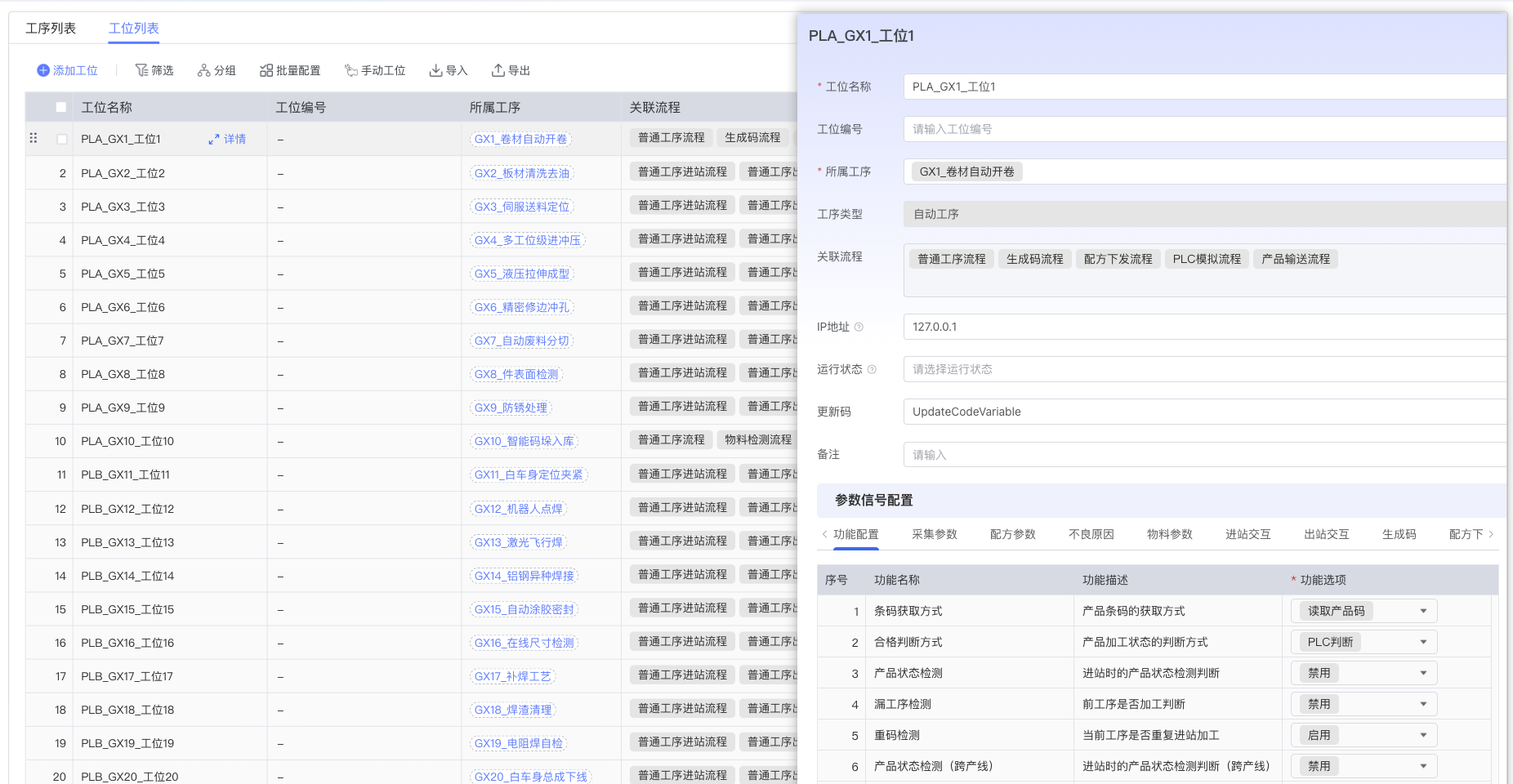
- Interface Layout: The Process Management module adopts a tab layout, including "Process List" and "Station List" tabs. Clicking on a process or station can pop up a drawer-style detail editing panel, supporting operations such as adding, editing, and deleting processes and stations.
2.1 Process Management
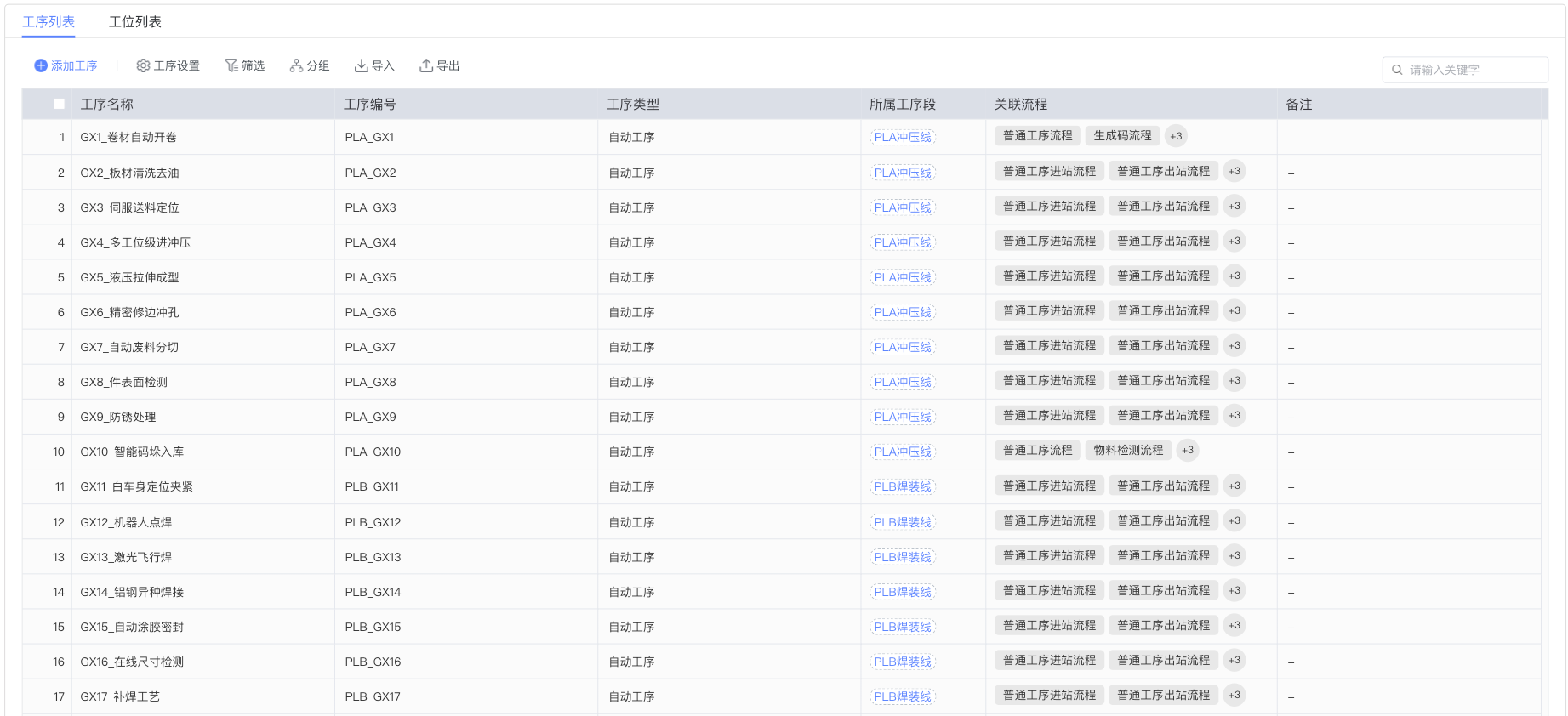
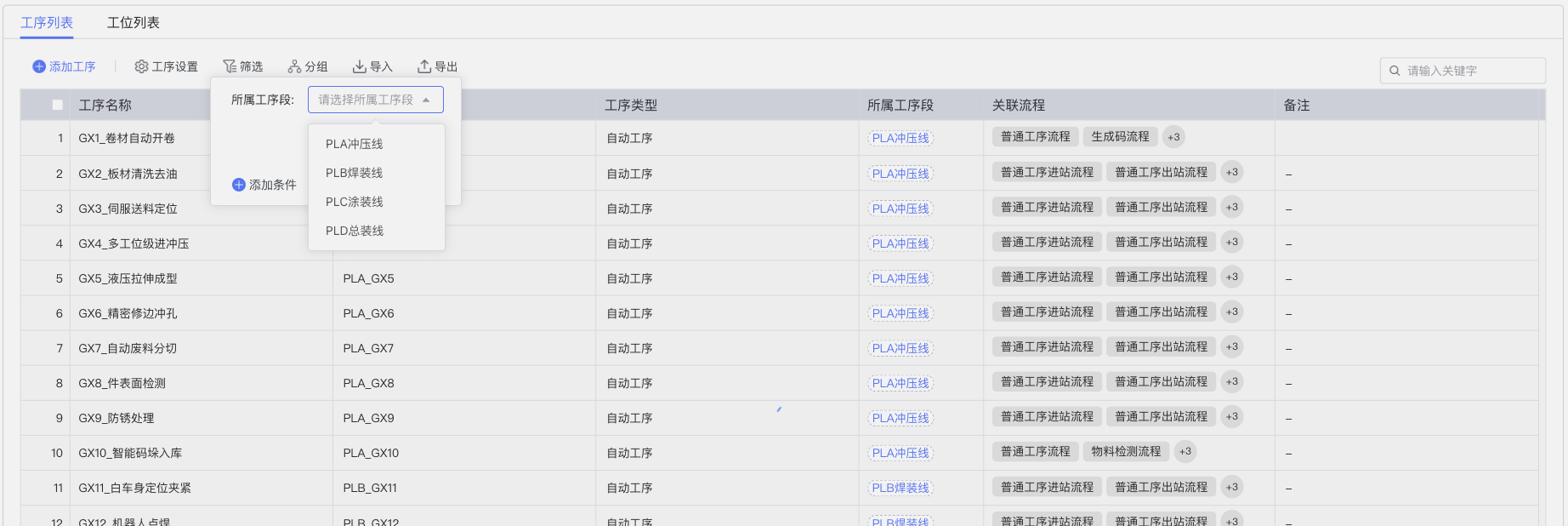
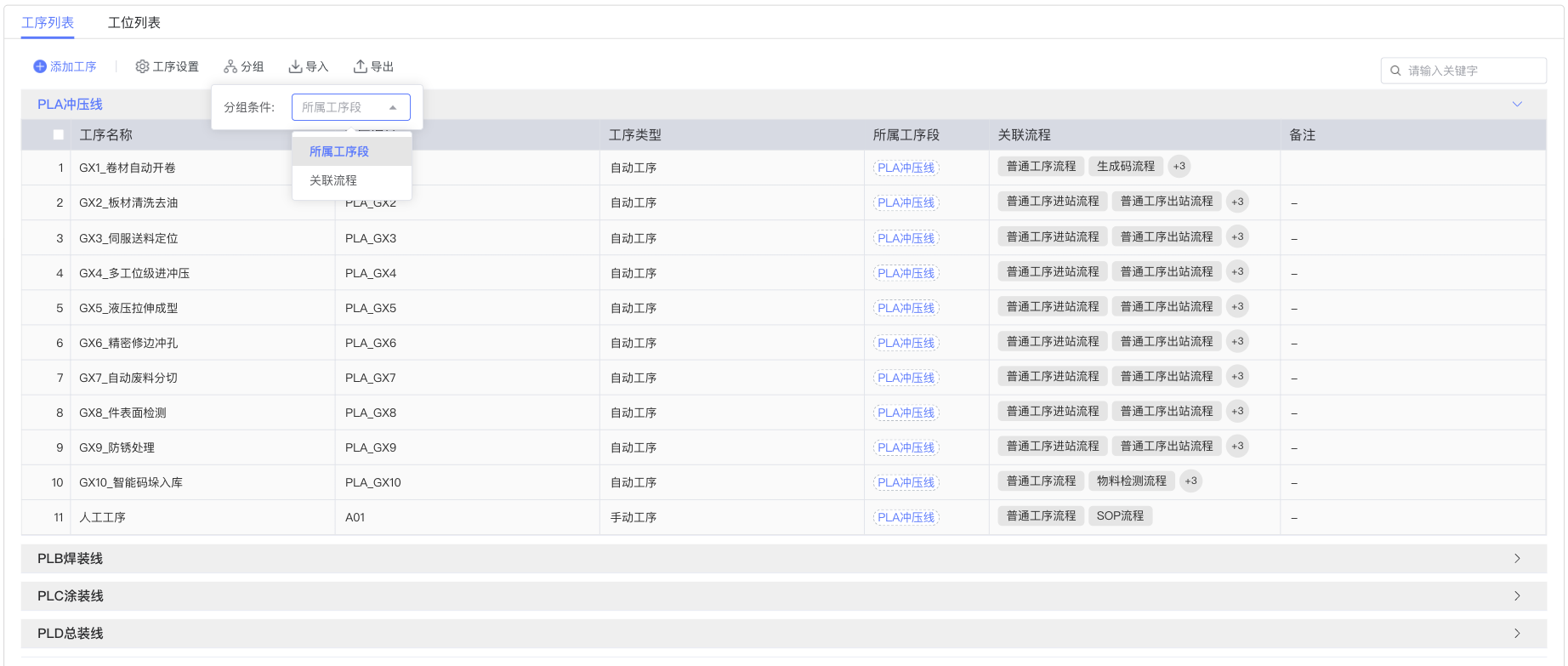
- Process List: Displays all created process information, including basic information such as process name, process type, status, etc. Supports filtering by process segment and process grouping management.
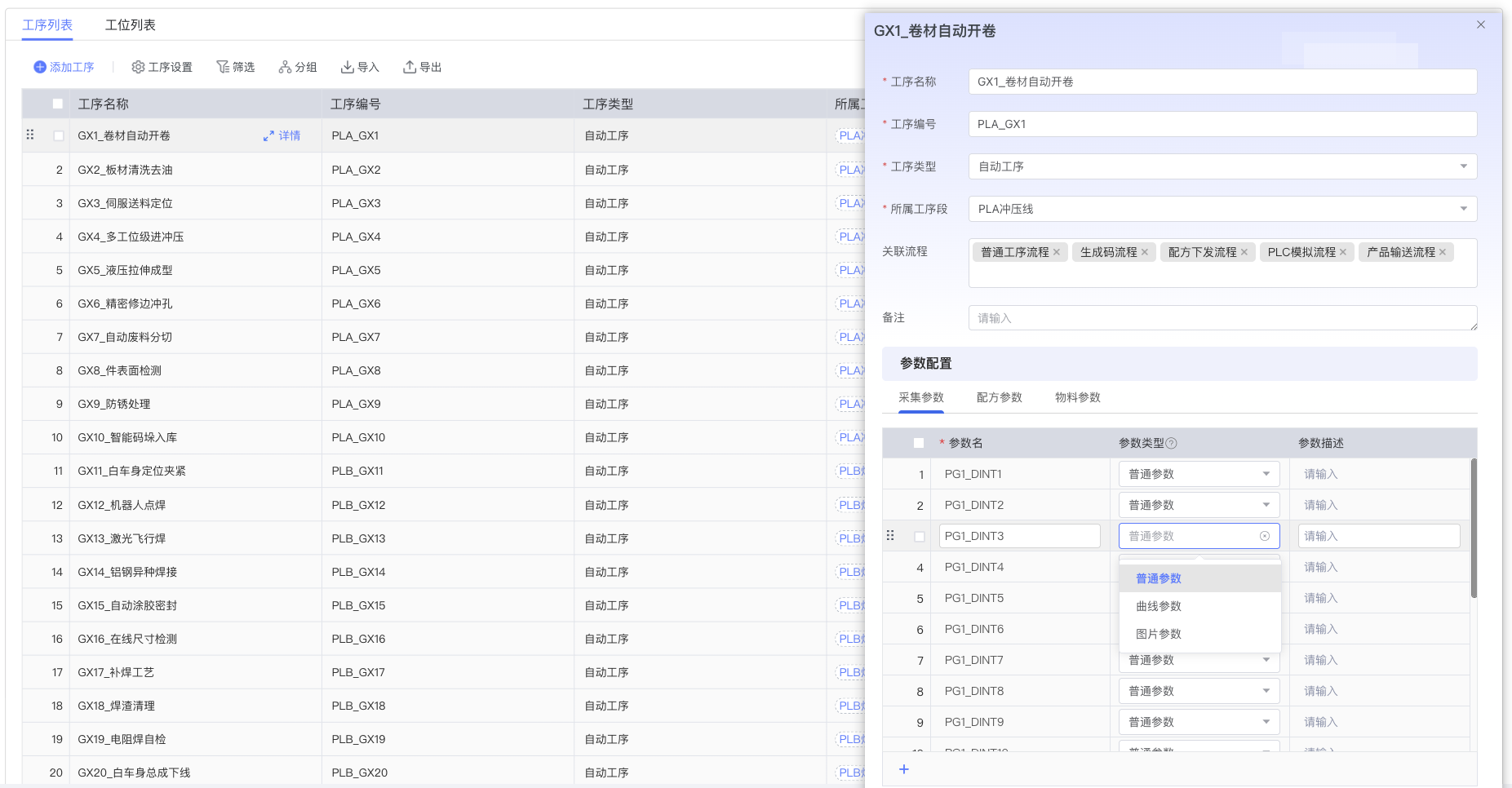
- Process Editing: Clicking a process row pops up a drawer-style process detail editing panel, supporting configuration of various parameters for the selected process.
2.2 Station Management
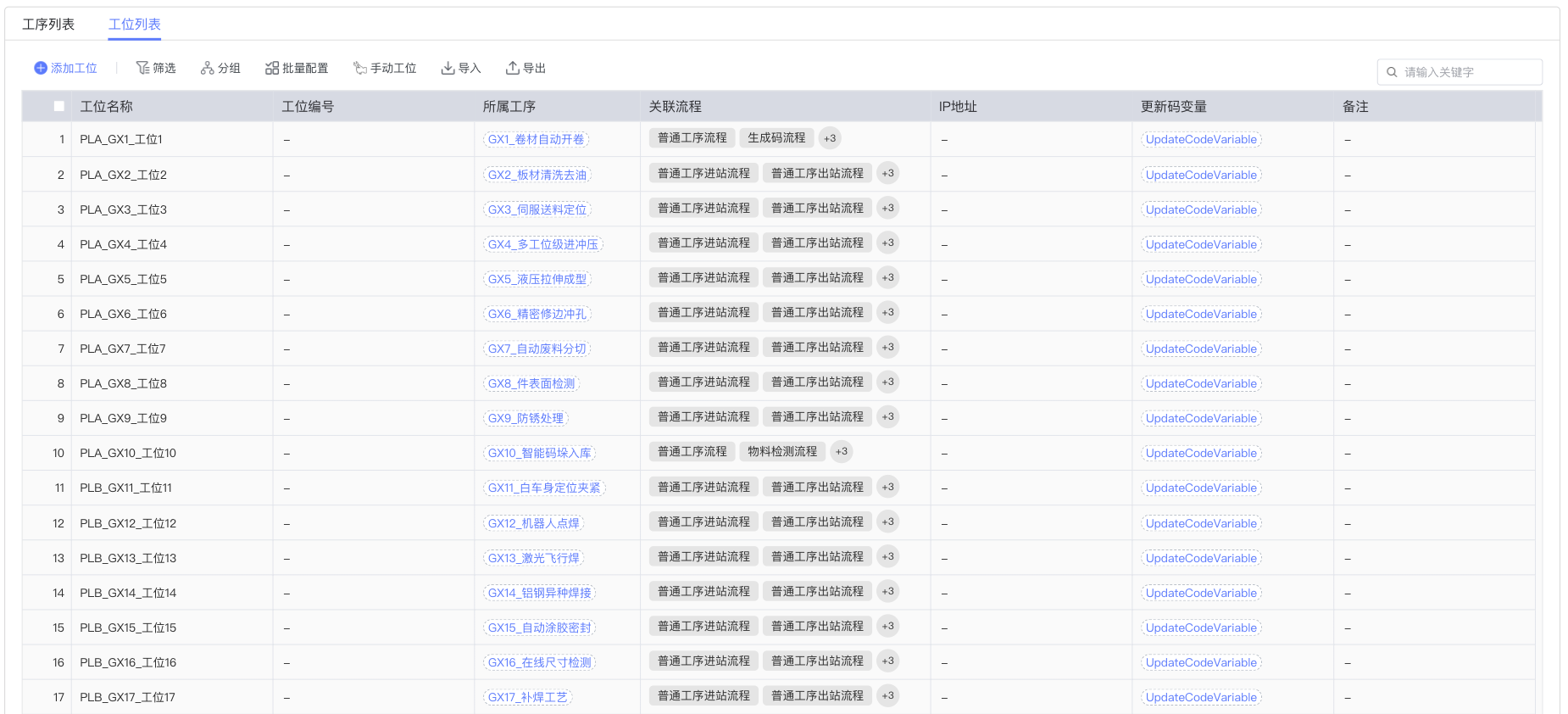
- Station List: Displays the station information configured under the current process, including station number, station name, equipment binding status, etc. Supports station grouping display and filtering functions, facilitating management of parallel stations.
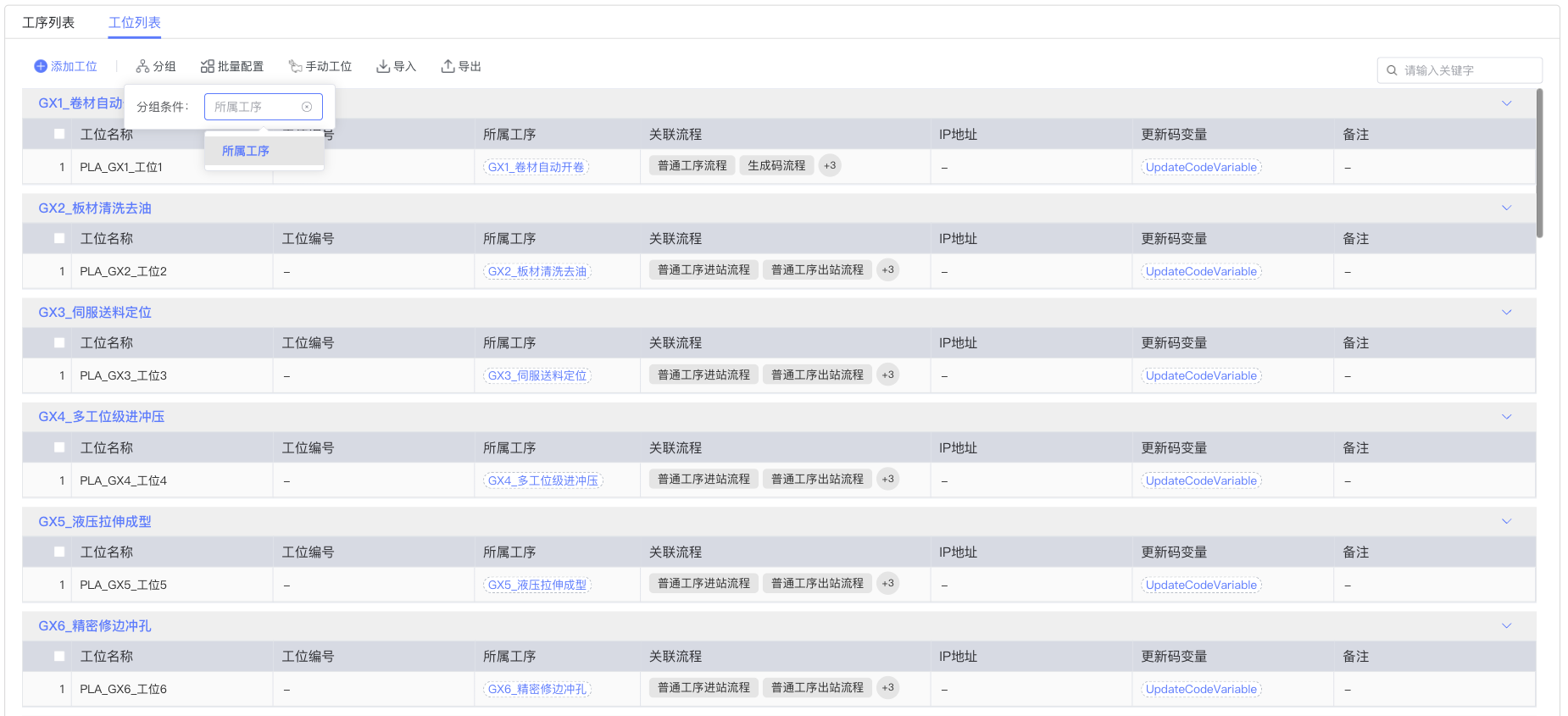
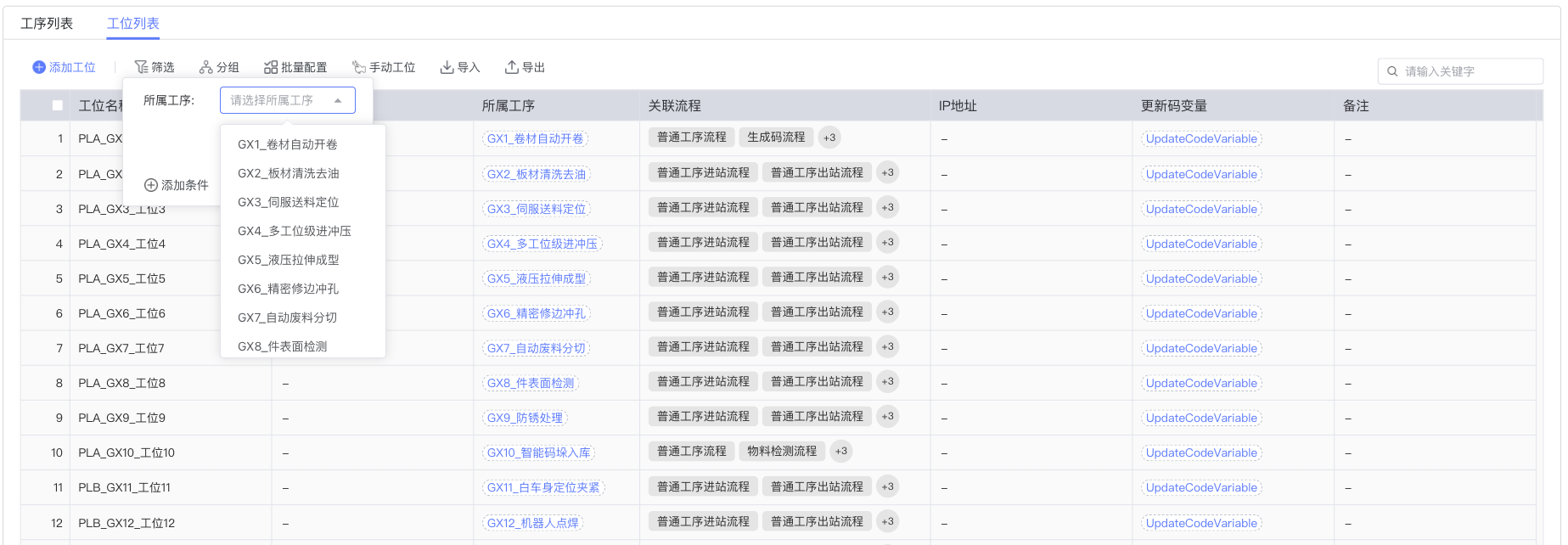
Supports station filtering, allowing quick location of target stations based on different conditions:
Parameter Signal Configuration
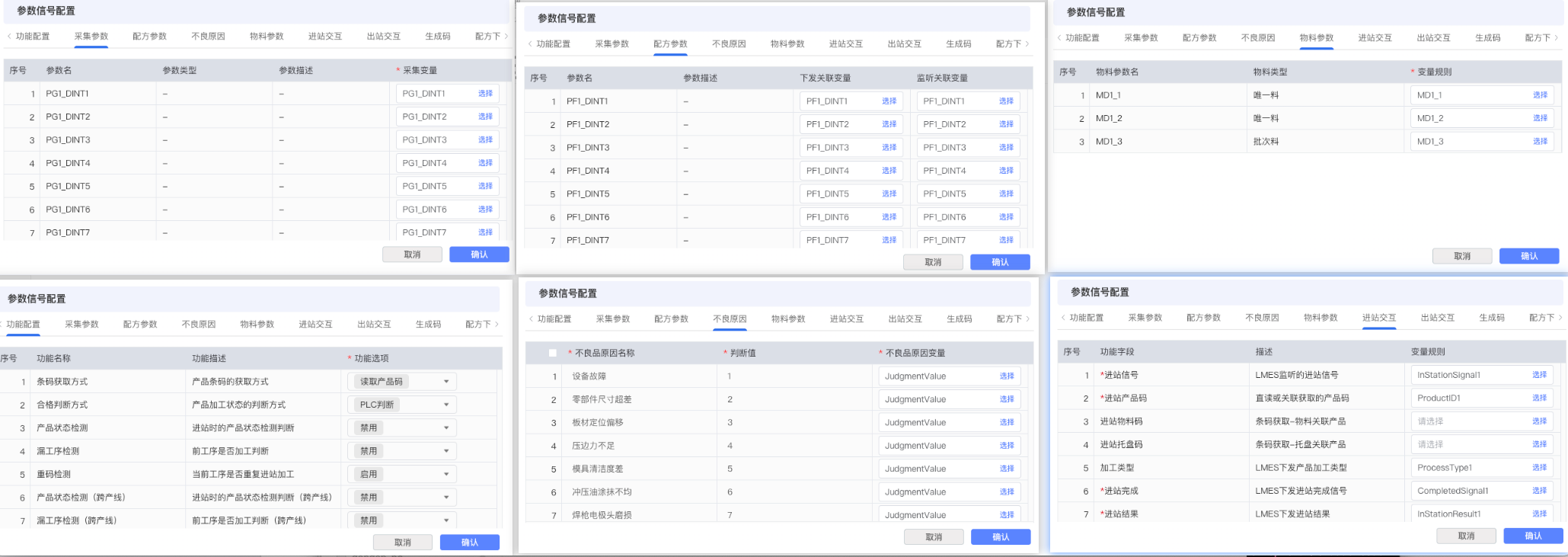
Station parameter signal configuration is divided into two categories: Inherent Attribute Configuration and Flow Template Configuration.
Inherent Attribute Configuration
These configuration items are inherent attributes of the station itself and are not affected by the associated flow:
-
Collection Parameters: Dynamically load the collection parameters configured for the selected process, supporting the definition of parameter collection variable names. The standard value, upper limit, and lower limit of the parameters are defined on the formula side. Variable names are provided by the CMS base, and actual PLC address mapping is maintained in the point table configuration of the CMS base.
-
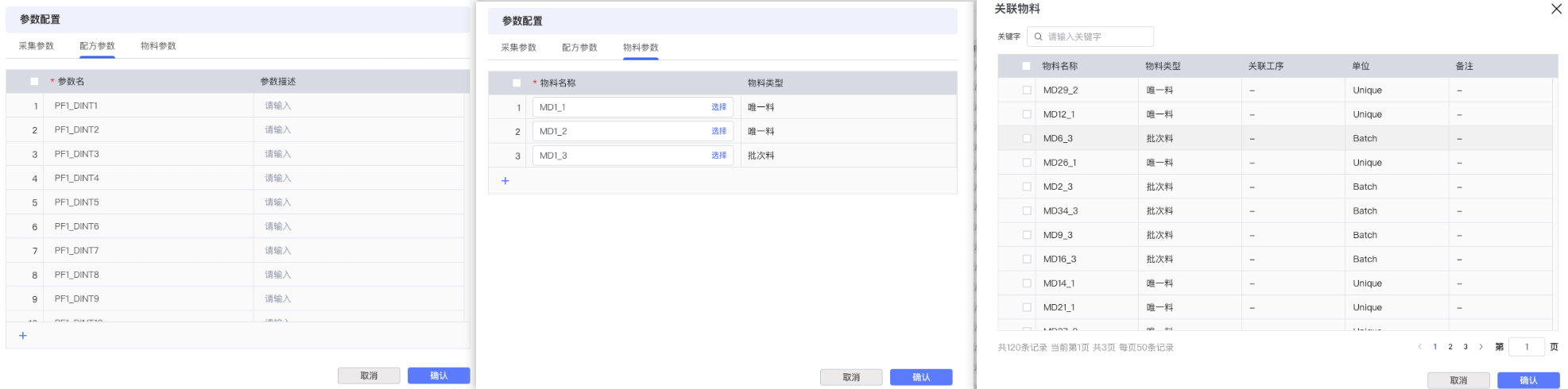
Formula Parameters: Dynamically load the formula parameters configured for the selected process, supporting the definition of parameter issuance and monitoring variable names. The issuance values of parameters are defined on the formula side. The mapping relationship between variable names and actual equipment addresses is uniformly managed in the CMS base.
-
Material Parameters: Dynamically load the material detection information configured for the selected process, supporting the definition of material detection signal variable names (detection trigger), material barcode variable names, material validation result variable names (result issuance), and binding materials (barcode values issued as cache after validation passes). All variable names are managed by the CMS base, and actual equipment communication addresses are configured in the base's point table.
-
Defect Reasons: Support defining station defect reasons, determining defects existing in the processing process based on the match between the return value of the variable and the set value of the defect reason in the list. The defect reason list supports right-click to add and delete parameter columns. Variable names are also configured here, not direct equipment addresses.
Flow Template Configuration
These configuration items are dynamically generated by the flow template associated with the station. Different flows will produce different Tabs and configuration options:
- Flow Association: First, you need to select the associated interaction logic flow template for the station. The flow template defines the interaction behavior and configuration structure of the station.
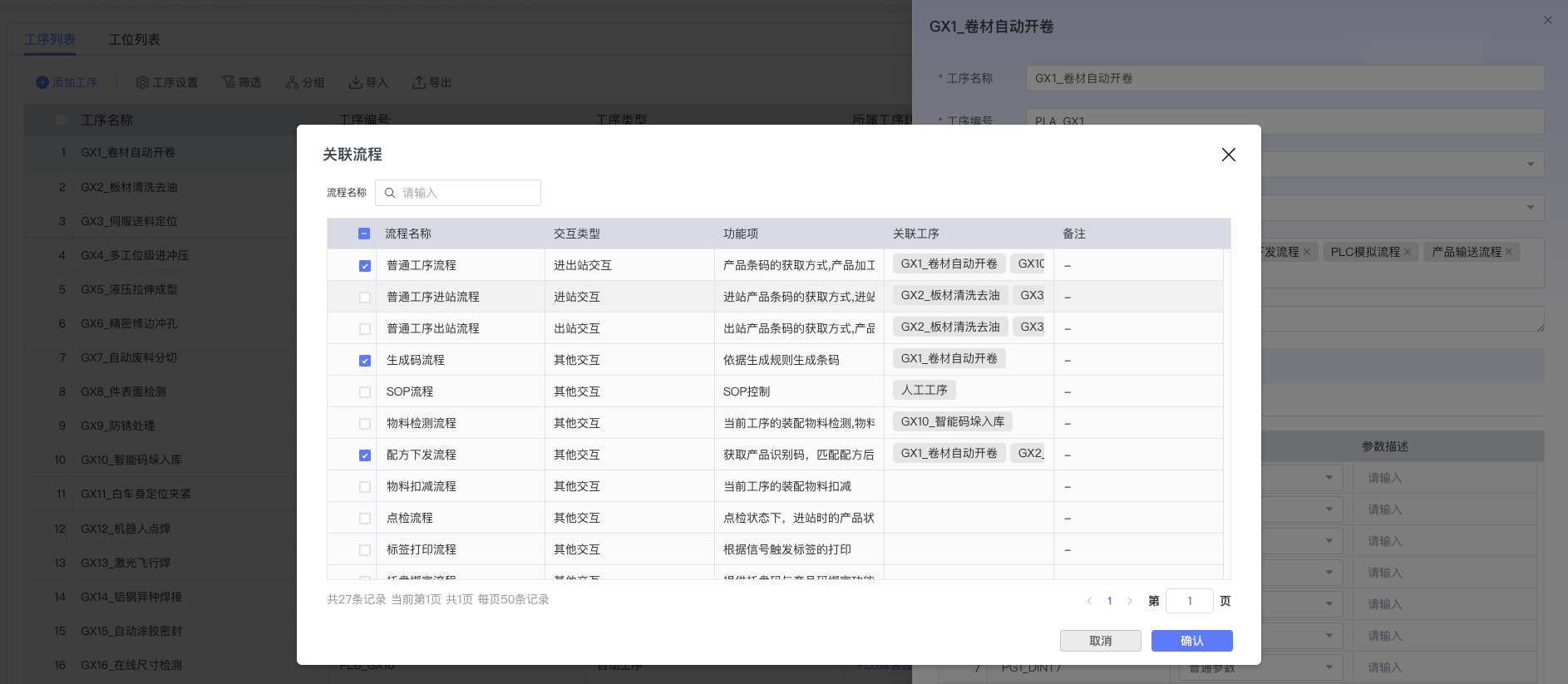
- Dynamic Configuration Items: According to the selected flow template, the system will dynamically load corresponding configuration Tabs, such as function configuration, inbound interaction, outbound interaction, etc. Each flow template has its specific combination of configuration items. All variable references involved in these configurations use variable names provided by the CMS base, not direct PLC addresses.
Important Note:
- Variable Management Architecture: All variable configurations in the Process Management module are based on variable names, which are uniformly provided and managed by the CMS base.
- Point Table Configuration: The CMS base maintains a complete point table configuration, responsible for mapping variable names to actual PLC addresses or equipment communication addresses.
- Flow Template: The flow template can be understood as the interaction logic configuration template of the station. It defines:
- Which interaction functions the station supports
- Which parameter variables need to be configured
- Inbound and outbound processing logic
- Data collection and processing methods
By selecting different flow templates, the station configuration interface will display different Tabs and configuration options, ensuring flexibility and pertinence of configuration. All variables referenced in the configuration process are logical names, completely decoupled from underlying hardware addresses.
3. Operation Guide
-
Task 1: Create New Process
- Step 1: Click the "New Process" button above the process list.
- Step 2: In the popped-up process information dialog box, fill in basic information such as process name, process type, description, etc.
- Step 3: Click the "Confirm" button to complete process creation. The system will display the newly created process in the process list.
-
Task 2: Configure Process Parameters
- Step 1: Click the process row that needs to be configured in the process list.
- Step 2: The system will pop up the process detail editing drawer. Select the corresponding configuration tab (Collection Parameters, Formula Parameters, Material Parameters, etc.) in the drawer.
- Step 3: Fill in the corresponding configuration parameters according to actual needs, including variable names, trigger conditions, etc. Note that the variable names configured here are provided by the CMS base, not direct equipment addresses.
- Step 4: Click the "Save" button to confirm the configuration. The system will save the configuration information of the current process.
-
Task 3: Configure Station Information
- Step 1: Switch to the "Station List" tab.
-
Step 2: Click the "New Station" button to add a new station configuration. For processes that need to increase capacity, multiple parallel stations can be added.
-
Step 3: Click the station row to pop up the station detail editing drawer, fill in basic station information such as station number, station name, equipment binding, etc.
-
Step 4: Select the associated flow template for the station. The flow template determines the interaction logic and configuration options of the station.
-
Step 5: According to the selected flow template, configure the station's inherent attributes (Collection Parameters, Formula Parameters, Material Parameters, Defect Reasons) and dynamically generated configuration items (Function Configuration, Inbound Interaction, Outbound Interaction, etc.).
-
Task 4: Station Batch Configuration
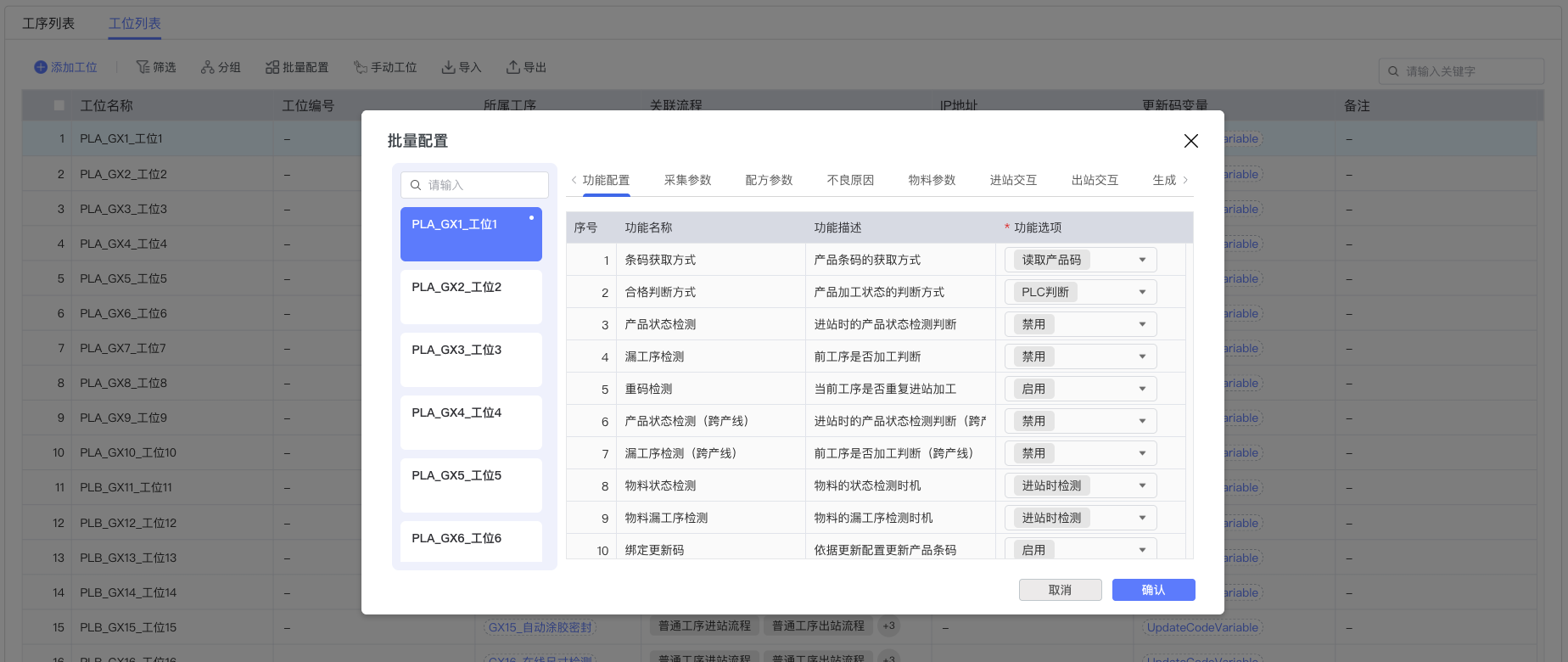
When the same configuration needs to be performed for multiple parallel stations, the batch configuration function can be used:
- Step 1: Select the stations that need batch configuration in the station list.
- Step 2: Click the "Batch Configuration" button to open the batch configuration dialog box.
- Step 3: In the batch configuration interface, you can set the same function configuration, collection parameters, etc., for multiple stations simultaneously.
5. Best Practices and Precautions
- Best Practices:
- It is recommended to create processes in the order of the actual physical layout of the production line to ensure the logic and continuity of process flow.
- Parallel Station Configuration: When a single station cannot meet capacity requirements, multiple parallel stations can be added under the same process. Parallel stations should be configured with the same flow template and parameters to ensure consistent processing of products at any station.
- When selecting a flow template for a station, choose the appropriate template based on the actual functional requirements of the station to avoid redundant configuration or missing necessary functions.
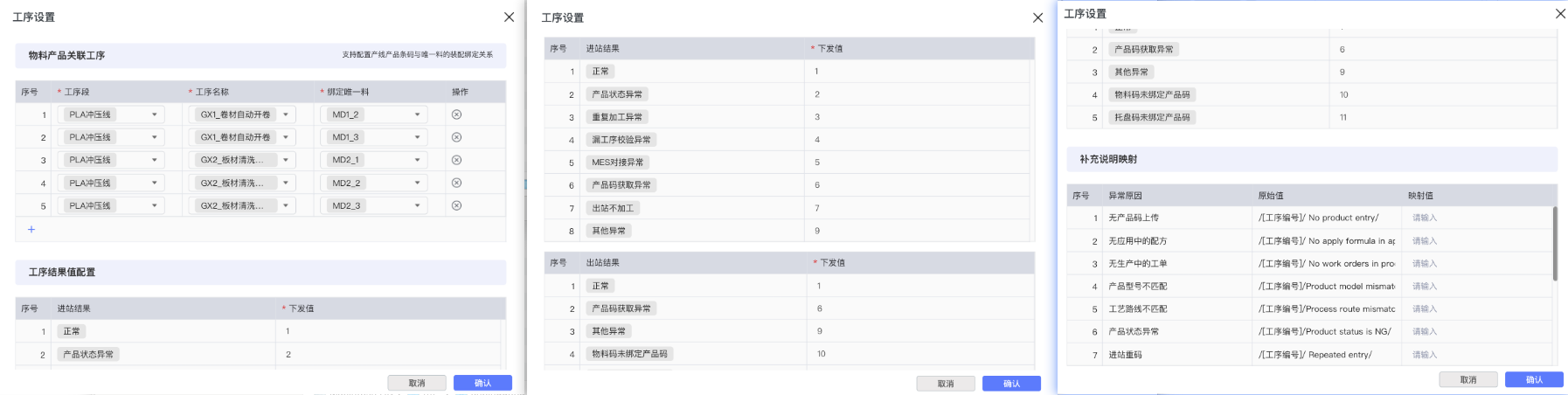
- Use the material product association process function to support the configuration of the assembly binding relationship between production line product barcodes and unique materials. Configure process result values for custom process inbound/outbound processing result issuance values, and supplementary description mapping for custom issuance descriptions when inbound/outbound exceptions occur.
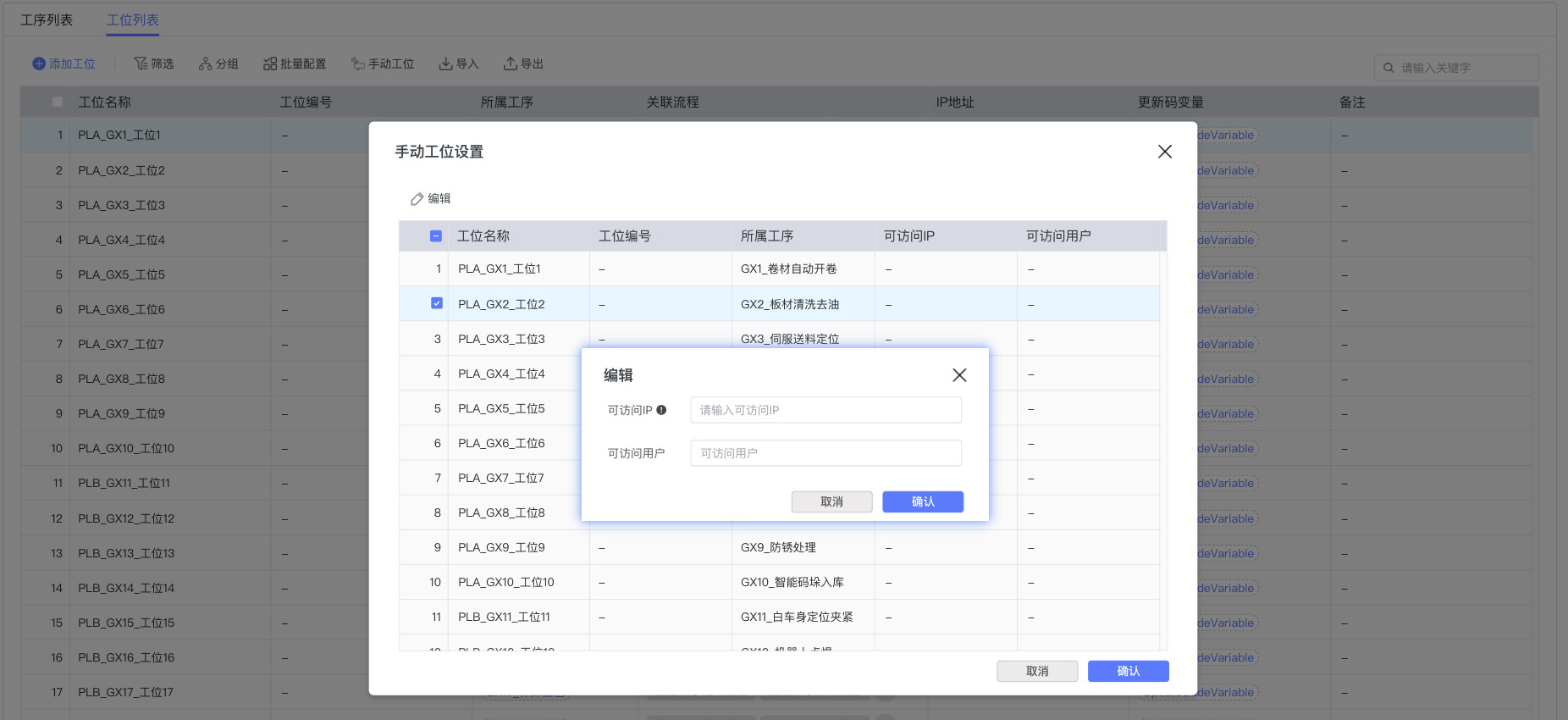
- For manual processes (semi-automatic processes), you need to configure the IP address of the industrial computer corresponding to the station and accessible user permissions to ensure that operators can correctly access the corresponding industrial control equipment.
-
When configuring collection parameters, fully consider the actual collection capability and data accuracy requirements of the equipment, and ensure that the selected variable names are correctly configured in the CMS base point table.
-
It is recommended to confirm the availability and naming convention of required variable names with the CMS base administrator before configuring station parameters.
-
Regularly check and update defect reason configurations to ensure timely identification and recording of quality problems in the production process.
-
Precautions:
- Process deletion is irreversible. Before deleting, please confirm that the process is not referenced by other modules.
- Parallel Station Management: When adding parallel stations, ensure that the configuration of all parallel stations remains consistent to avoid product quality inconsistencies caused by configuration differences.
- Manual Process Configuration: For manual processes (semi-automatic processes), the industrial computer IP address and accessible user permissions must be configured correctly to ensure network connectivity and the validity of user permissions.
- Flow template selection directly affects station configuration options. Changing the flow template may result in the loss of existing configurations, so operate with caution.
- Station inherent attribute configurations (Collection Parameters, Formula Parameters, Material Parameters, Defect Reasons) are not affected by flow templates and can be configured independently.
- Important: All variables configured in the station are variable names, not actual PLC addresses. Variable names must exist in the CMS base point table configuration, otherwise communication will not be normal during runtime.
- Addition, deletion, or modification of variable names needs to be done at the CMS base level. The Process Management module is only responsible for referencing existing variable names.
- Inbound and outbound interaction configurations are dynamically generated by flow templates. Please fully understand the logical structure of the flow template before modification.
- Material detection configuration is related to the accuracy of product traceability. Please ensure that relevant variable names are correctly configured and available in the base point table.
6. Appendix
- Term Explanation:
- Process: A series of ordered operations or steps in the product manufacturing process, containing specific tasks and resource requirements.
- Manual Process: Also known as semi-automatic process, a process type requiring manual operation cooperation, usually needing configuration of industrial computer IP address and operating user permissions.
- Station: A specific operating position on the production line, a combination of personnel, equipment, and tools.
- Parallel Station: Multiple stations configured under the same process, used to execute the same production task to increase capacity. Parallel stations usually have the same flow template and parameter configuration.
- Flow Template: The interaction logic configuration template of the station, defining the interaction behavior, configuration structure, and processing logic of the station. Different flow templates provide different configuration options and Tabs for the station.
- Inherent Attribute: Basic attribute configuration of the station itself, such as Collection Parameters, Formula Parameters, Material Parameters, Defect Reasons, etc., unaffected by associated flows.
- Variable Name: Logical variable identifier used in the Process Management module, uniformly managed by the CMS base, decoupled from actual hardware addresses.
- CMS Base: System underlying basic platform, responsible for managing point table configuration, maintaining the mapping relationship between variable names and actual equipment addresses.
- Point Table Configuration: A mapping table of variable names to PLC addresses or equipment communication addresses maintained in the CMS base, serving as a bridge for communication between variable names and hardware.
- Collection Parameters: Data parameters collected in real-time from production equipment or sensors, used to monitor the production process.
- Formula Parameters: Process control parameters issued to production equipment, used to guide equipment to execute according to specified processes.
- Material Parameters: Configuration parameters related to material detection, including material detection signal, barcode variable, validation result, etc.
- Inbound Interaction: Data interaction and flow control when a product enters a station, defined by the associated flow template.
- Outbound Interaction: Data interaction and flow control when a product leaves a station, defined by the associated flow template.
- PLC: Programmable Logic Controller, equipment used for industrial automation control.