Product Management
1. Module Overview
Core Function: The Product Management component is the core module of the production management system, mainly used for the maintenance and management of product information.
- Component Identifier: ProductManagement
- Component Name: Product Management
- Component Category: run (plugin)
Core Function: The Product Management component is the core module of production process modeling, used to unify the maintenance of "Product Basic Information", associations with "Formulas (BOM/Process Parameters)" and "Process Routes", and provide standardized product master data for planning and production execution.
Application Scenarios: New product introduction, product version iteration, modeling of standard parts/components, maintenance of planning coefficients for different production lines, batch data import/export, etc.
2. Page Structure and Functional Areas
-
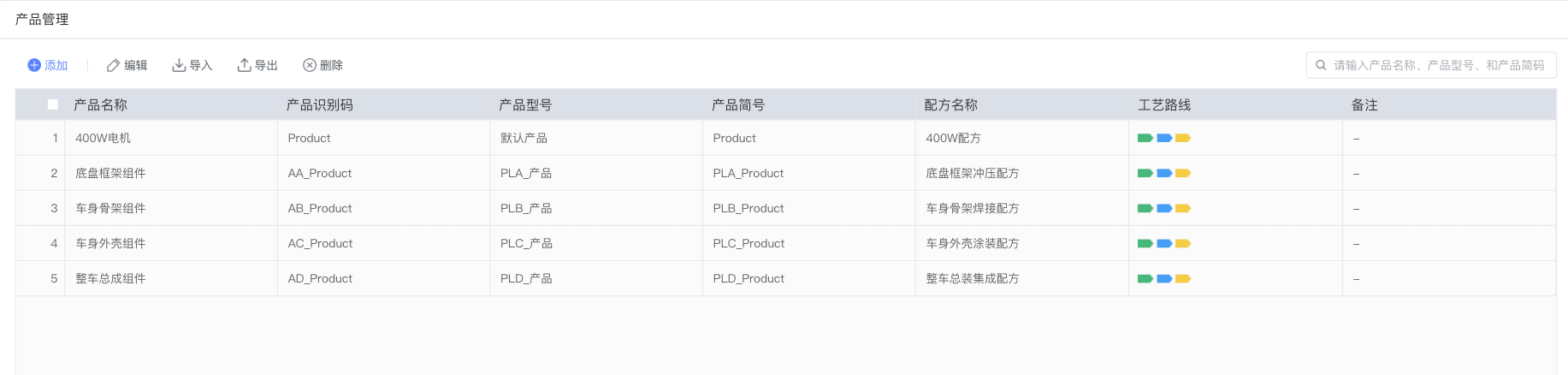
Top Toolbar:
- Add: Create a new product entry.
- Edit: Open the edit drawer to modify product information after selecting a product.
- Import: Batch import product data by template (recommended for administrators or users with corresponding permissions).
- Export: Export the product list under current filter conditions (for data backup or analysis).
- Delete: Delete selected products. Related production data cannot be recovered after deletion.
-
Search Area:
- Keyword Search Box (Placeholder: "Please enter product name, product model, and product short code"), supports fuzzy search by product name, model, and short code.
- Checkboxes on the left side of the list are used to select rows (supports multiple selection).
-
List Area (Main Fields):
- Product Name
- Product Identification Code
- Product Model
- Product Short Code
- Formula Name (Collection of formulas/process parameters associated with the product)
- Process Route (Display the name of the process route associated with the product)
- Remarks
- Bottom pagination information (Default 50 records per page).
3. Create/Edit Product
Creating and editing use the same form. Field descriptions are as follows:
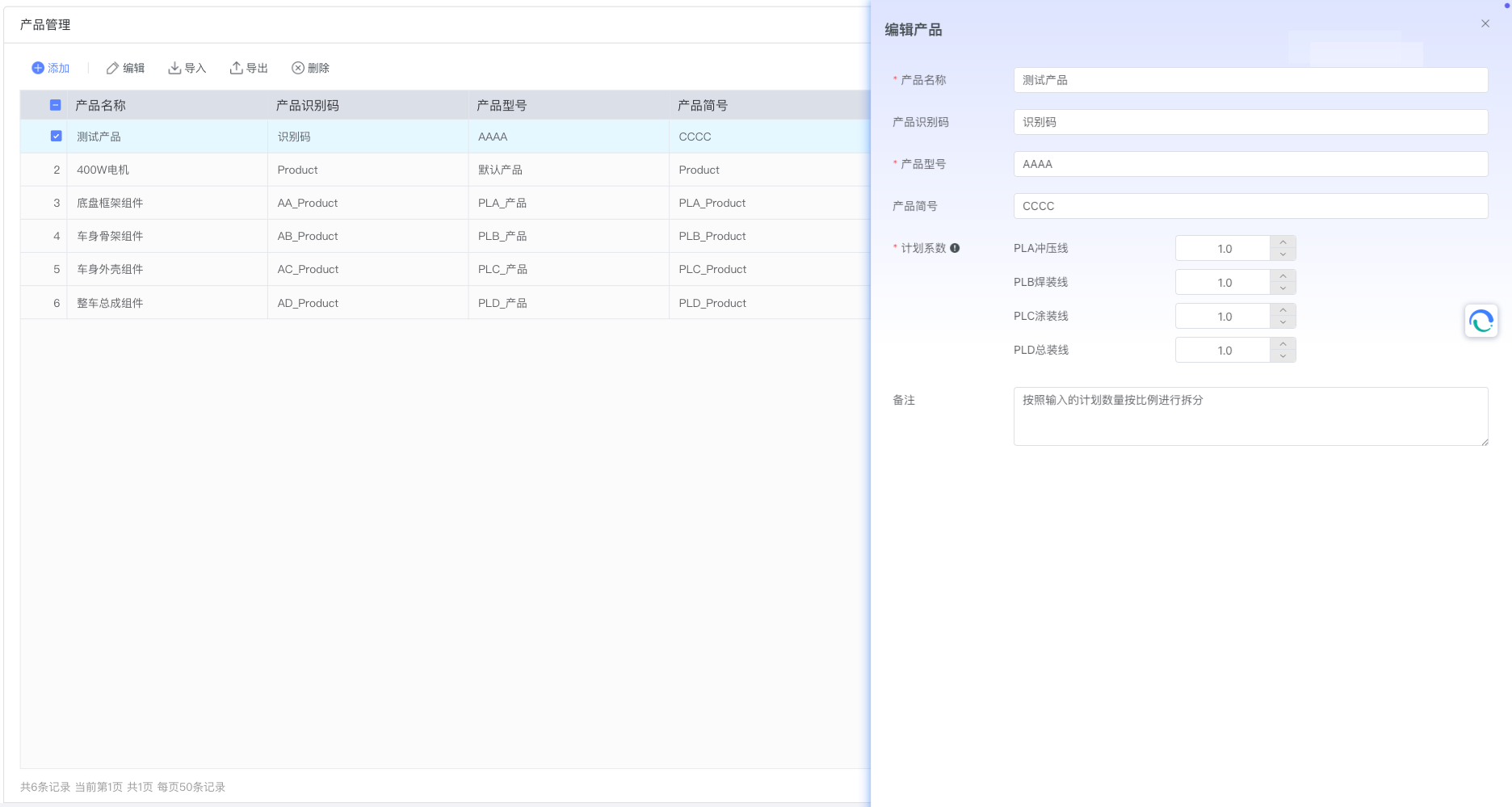
- Product Name (Required): Used to identify the main name of the product, recommended to be unique and clearly readable.
- Product Identification Code (Optional): Unique code used for system or external system docking, facilitating data synchronization and identification between systems.
- Product Model (Required): Model or specification, such as "400W Motor", "Chassis Frame Assembly", etc.
- Product Short Code (Optional): Simplified code or abbreviation, facilitating quick entry and retrieval on site.
- Planning Coefficient (Required): Coefficient for maintaining plan allocation or capacity calculation for different production lines, default value is 1.0.
- PLA Stamping Line: Planning coefficient of this product on the stamping line.
- PLB Welding Line: Planning coefficient of this product on the welding line.
- PLC Painting Line: Planning coefficient of this product on the painting line.
- PLD Assembly Line: Planning coefficient of this product on the assembly line.
- Usage Suggestion: When a product needs to be split or produced in linkage on multiple production lines, the proportion or priority can be reflected through the coefficient; a larger coefficient represents a higher planned volume undertaken by the production line (specific splitting logic is subject to enterprise configuration).
- Remarks: Supplementary explanation, such as "Split proportionally according to the input planned quantity".
Operation Steps:
- Create: Click "Add" → Complete the above field filling → Click "Confirm" to save.
- Edit: Check the target product → Click "Edit" → Modify fields → Click "Confirm" to save.
4. Import and Export
- Import:
- Purpose: Batch create or update product master data.
- Suggested Process: Export template → Fill in template columns (Product Name, Identification Code, Model, Short Code, Planning Coefficients for each line, Remarks, etc.) → Upload and import.
- Validation Suggestion: Ensure Product Name/Identification Code is unique in the system to avoid conflicts caused by duplicate imports; Planning Coefficient is suggested to be a positive number or within a range acceptable to the business.
- Export:
- Purpose: Export the product list under current filter conditions as a file for backup, analysis, or docking with third-party systems.
- Suggestion: If full export is needed, clear search conditions before executing export.
5. Delete Product
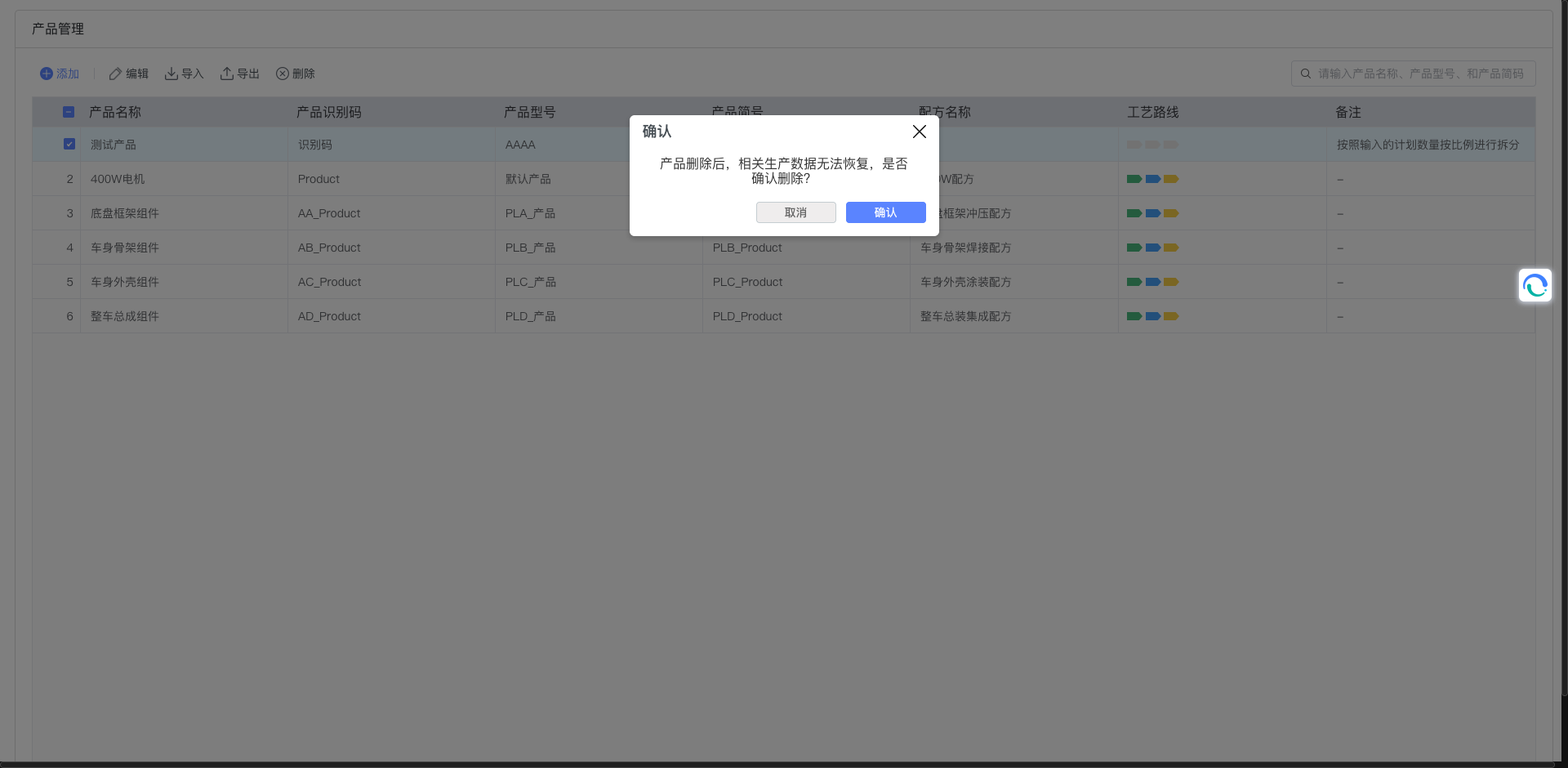
- First check the products to be deleted in the list → Click "Delete". The system will pop up a confirmation prompt: "After the product is deleted, relevant production data cannot be recovered. Are you sure you want to delete?"
- Deleted immediately after confirmation and cannot be recovered. It is recommended to perform deletion only when confirming data that is no longer used or created by mistake; products used in production are recommended to use "Deactivate/Disable" strategies (if supported by the system) instead of direct deletion.
6. Search and Filtering
- Keyword search supports fuzzy matching of Product Name, Product Model, and Product Short Code.
- Checkboxes support multi-row selection to perform batch operations such as "Edit/Delete/Export".
- Recommended to use with export function for data verification: First filter by keyword, then export current results.
7. Relationship with Other Modules
- Relationship with Formula (BOM/Process Parameters): The product displays "Formula Name" in the list, actually maintained in the "Formula Management/Process Parameters" module; the binding of product and formula is used to guide feeding, process parameter issuance, etc.
- Relationship with Process Route: The product displays "Process Route" in the list, actually maintained in the "Process Route" module; used to guide node sequence and job assignment of the production process.
- Planning and Scheduling: Planning coefficient is an important parameter for cross-line splitting or capacity calculation. Using it with the planning module can achieve multi-line collaborative production.
8. Common Questions and Suggestions
- Q: How to set the planning coefficient?
- Suggestion: Based on 1.0, if a certain production line undertakes more output, the coefficient can be appropriately increased; if strict proportional splitting is required, please keep consistent with the configuration strategy of the planning module.
- Q: Is it mandatory to maintain the Product Identification Code?
- Suggestion: If integration with external systems (ERP, PLM, MES) is required, the identification code should be consistent with the docking system and ensure uniqueness; it can be empty for internal use only.
- Q: How to troubleshoot import failure?
- Suggestion: Check if template column names and formats are correct; confirm required items (Product Name, Product Model, Planning Coefficient) are filled; avoid duplicate names or identification codes causing conflicts.
- Suggestion: Products already used in production should avoid deletion as much as possible. Risks can be reduced through deactivation strategies or version management.
9. Permission Description (Suggestion)
- Sensitive operations such as Add/Edit/Import/Delete are only open to users with "Product Management" permission.
- Ordinary users are recommended to only have "View and Export" capabilities to ensure master data changes are controlled and auditable.