SOP (Standard Operating Procedure)
The SOP module is the core module in the LMES system for configuring and managing Standard Operating Procedures (SOP), providing complete work instruction and process control functions for manual boards.
- Component ID: SopManagement
- Component Name: SOP Management
- Component Category: run (Plugin)
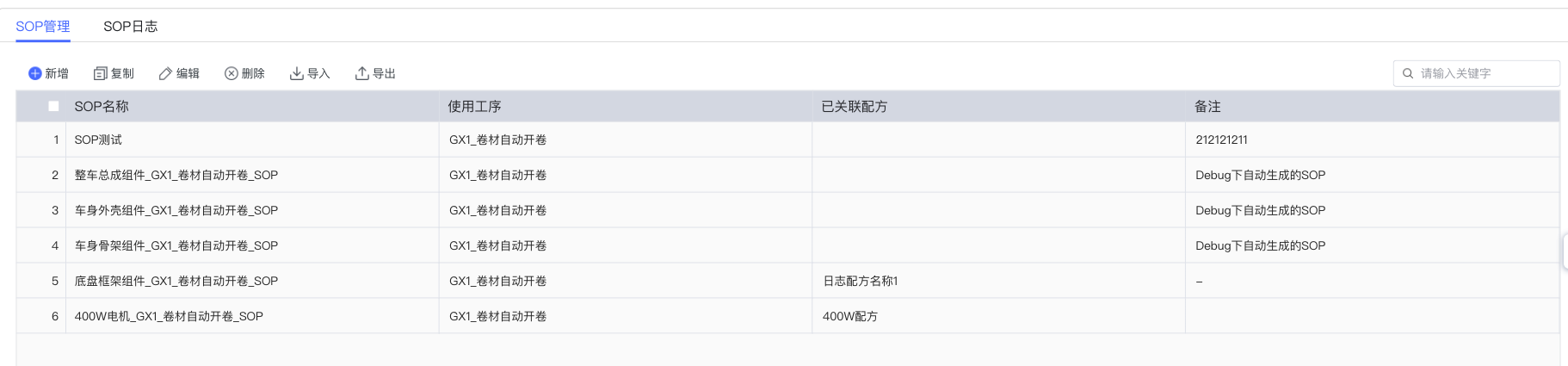
1. Module Overview
Core Function
The SOP module is responsible for configuring and managing various components in the manual board, including process control, step control, SOP file display, etc., ensuring standardization and specification of the production process.
User Value
- Standardized Operation: Provide unified standard operating procedures for production processes.
- Process Control: Achieve precise control and supervision of the production flow.
- Visual Guidance: Provide intuitive work instructions to operators through multimedia files.
- Data Traceability: Record and track key data during SOP execution.
2. Core Component Description
The SOP management module contains the following 11 core components:
| Component Name | Function Description |
|---|---|
| Process Filter | Filter data based on process conditions |
| Step List Component | Display and manage specific operation steps in the process |
| SOP File Display Box | Display standard operation files associated with the current step |
| Statistical Parameter Display Box | Display key statistical indicators in the production process |
| Production Parameter List | Manage and display production-related parameter configurations |
| Production Material List | Display material information required for the current process |
| Material Input Box | Provide input interface for material data |
| Production Control | Control the start/stop and status transition of the production flow |
| Batch Material Operation | Manage operations related to batch materials |
| Step Monitoring Display Box | Monitor step execution status and progress in real-time |
| Process SOP Display Box | Display standard operating procedures at the entire process level |
Process Control Logic
SOP follows the following main process control logic:

3. Operation Guide
3.1 Configuration Item Management
SOP supports the following configuration items to participate in manual board configuration (Process Management Configuration Items):
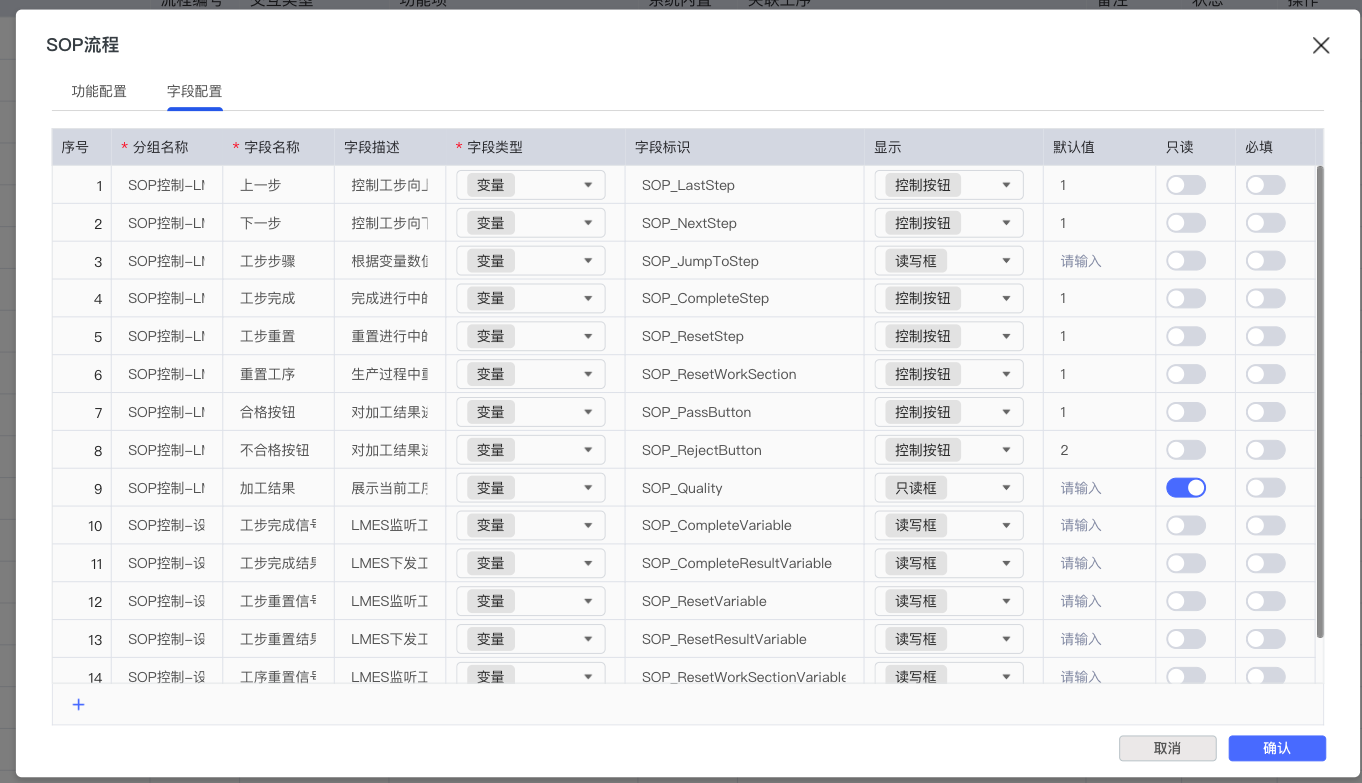
3.2 Add SOP Configuration
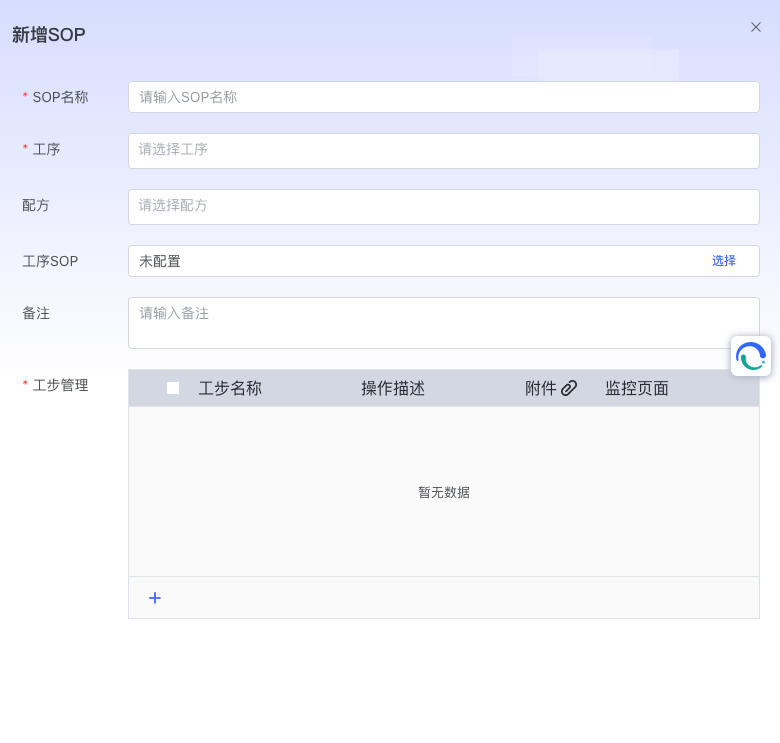
Basic Configuration Steps
- Enter SOP Name: Define a unique identifier name for the new SOP.
- Configure Belonging Process: Select the specific process to which the SOP belongs.
- Associate Recipe: Bind related production recipes.
- Bind Process SOP File: Upload or associate standard operation files.
- Configure Step Management: Set detailed operation steps.
Completing the above steps creates a basic SOP configuration:
3.3 Step Effect Configuration
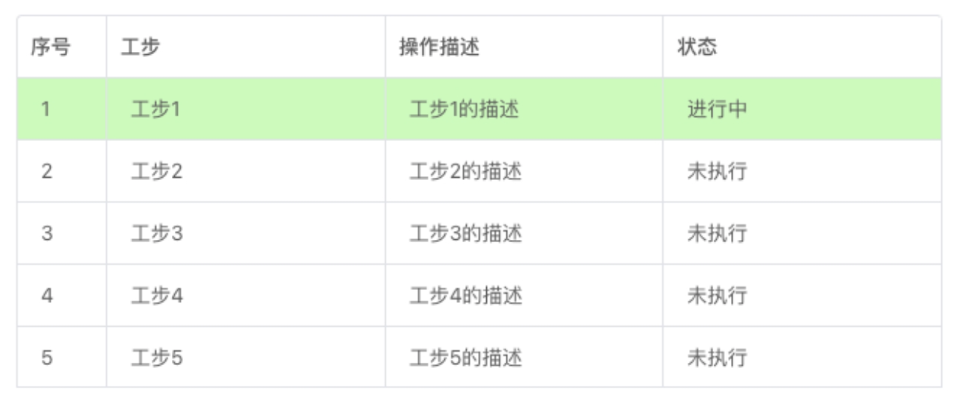
Configure Step Display Effect
To configure step effects in the manual board, please follow these steps:
- Enter Step Management Configuration.
- Configure each step sequentially.
- Configure corresponding attachments for each step.
Display effect after configuration:
SOP File List Configuration
Select "SOP File List" in the attachment configuration for detailed configuration:
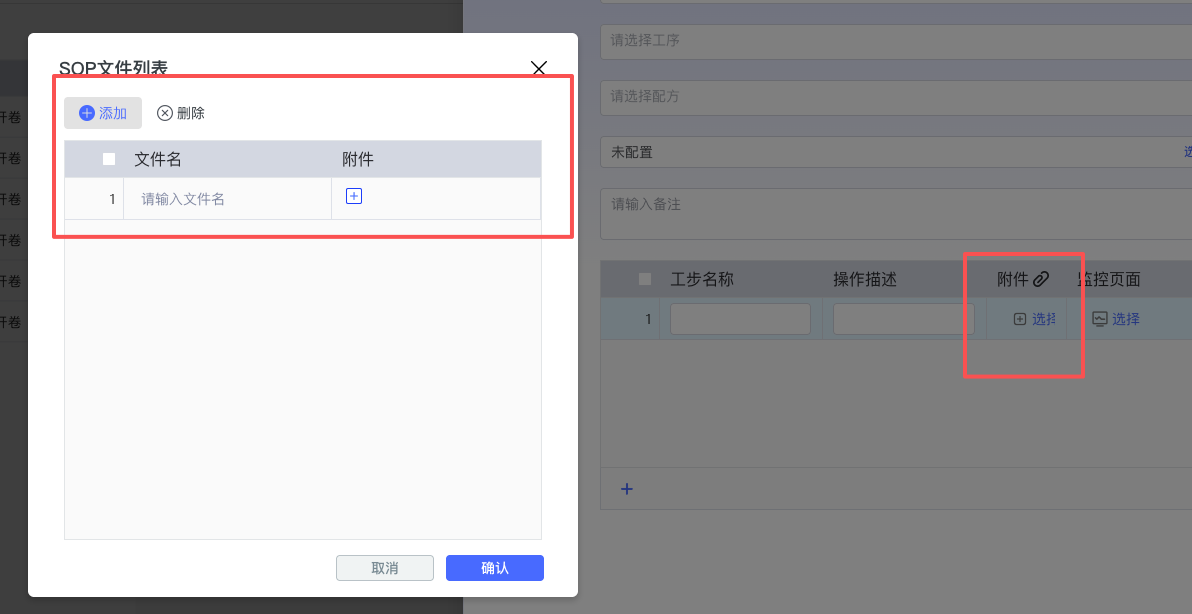
After configuration, the following effect will be presented in the manual board:

3.4 SOP File Display Configuration
Important Reminder
Note: The SOP File Display Box has an association relationship with the Step List Component. If there is no Step List Component in the page canvas, the SOP File Display Box will not be able to display data normally.
For specific configuration details, please refer to the relevant documentation of the Manual Board module.
3.5 Process SOP Configuration
Supported File Formats
- Image Formats: JPG, PNG, etc.
- Document Formats: PDF
- Video Formats: MP4 and other mainstream video formats
Both the SOP File Display Box and Process SOP Guide support the above file formats. After configuration, you can drag and drop the Process SOP Display Box component in the manual board to achieve the expected display effect.
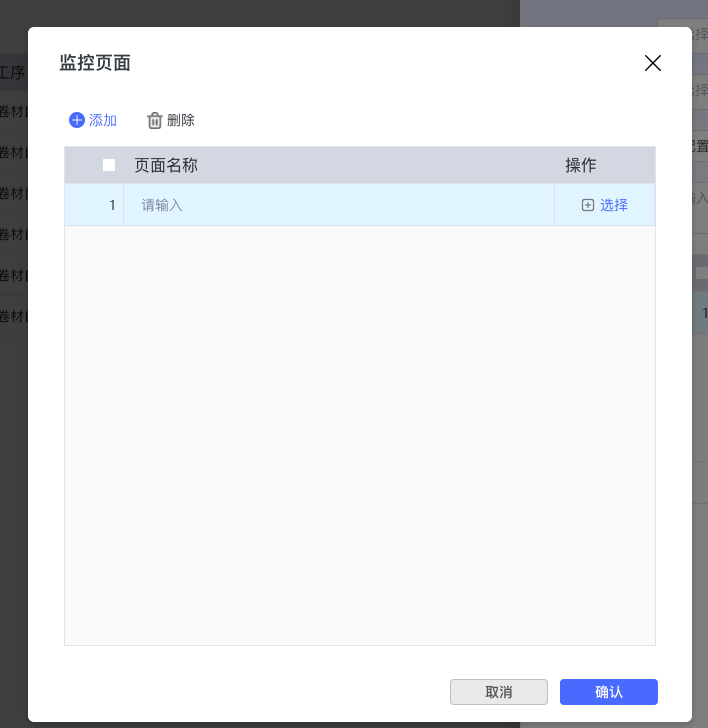
3.6 Monitoring Page Configuration
Functional Features
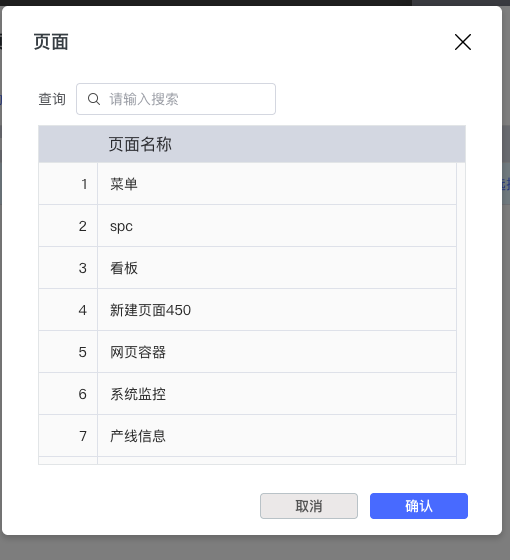
The monitoring page can select all menu items within the current project. The configured menu has a page container function, supporting page switching via left and right arrows.
Configuration Interface
Usage Effect
3.7 Data Management Functions
SOP provides complete data management functions:
- Import/Export Function: Supports batch data import and export.
- Copy Function: Quickly copy existing configurations.
- Edit Function: Modify existing SOP configurations.
- Delete Function: Remove unneeded SOP configurations.
4. SOP Log
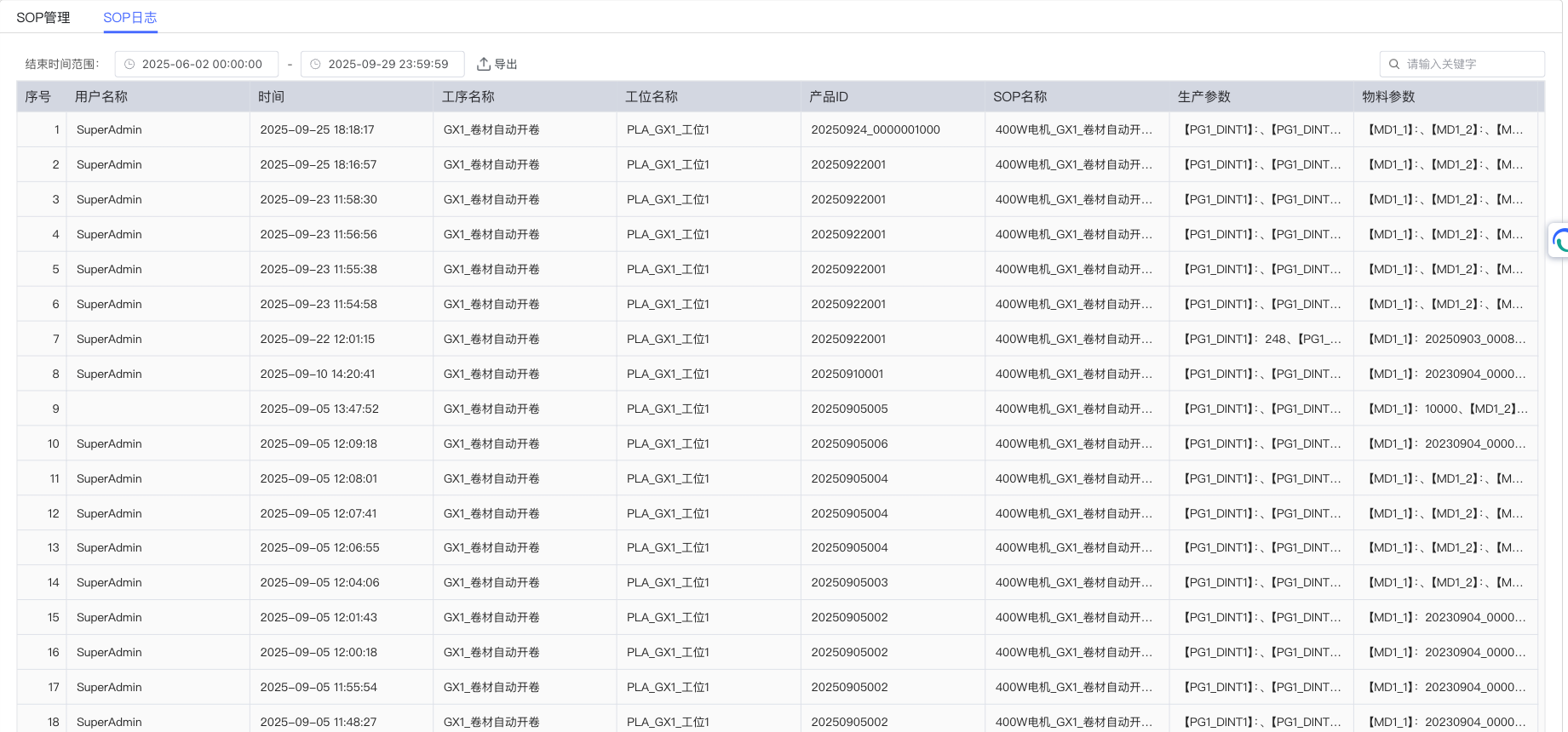
Log Recording Function
The system automatically records all executed SOP operations, providing complete data traceability support for the production process:
Log Field Description
The SOP execution log contains the following key information:
| Field Name | Description |
|---|---|
| User Name | User identifier executing the SOP operation |
| Time | Specific execution time of the SOP operation |
| Process Name | Name of the associated production process |
| Station Name | Specific station executing the operation |
| Product ID | Associated product identifier |
| SOP Name | Name of the specific SOP executed |
| Production Parameters | Production parameters involved in the execution process |
| Material Parameters | Material parameters involved in the execution process |
Query and Export Function
- Time Range Filter: Supports querying historical records by time interval.
- Keyword Search: Supports multi-field keyword fuzzy query.
- Data Export: Supports exporting filtered results as a file.
5. Best Practices and Notes
Configuration Suggestions
- Component Association: Ensure correct association between the SOP File Display Box and the Step List Component.
- File Format: Recommend using standard format multimedia files to ensure compatibility.
- Permission Management: Rationally configure user permissions to ensure operation security.
Performance Optimization
- File Size: Control the size of uploaded files to avoid affecting system performance.
- Data Cleanup: Regularly clean up expired log data to maintain system operating efficiency.
For more detailed information, please refer to the relevant module documentation: [Manual Board Module](../../Production Operation Management/Manual Board/README.md)