Audit Log
1. Module Overview
Core Function: The Audit Log module is an important security component in the LMES system, collecting and persisting all key operation information in the system through automated means. Built on the ABP framework, this module provides complete operation traceability capabilities, including request information, execution time, exception details, and entity change records. Audit logs provide a comprehensive security monitoring mechanism for the system, supporting multi-dimensional log query and analysis, helping administrators track user operations, troubleshoot system problems, and meet compliance requirements.
- Component Identifier: LogManagement
- Component Name: Audit Log
- Component Category: run (Plugin)
2. Scenario Description
Users will need to use this module in the following business scenarios:
- Security Audit and Compliance Check: Administrators need to regularly review key operation records in the system to ensure all operations comply with security specifications and internal process requirements.
- Problem Troubleshooting and Fault Diagnosis: When the system experiences exceptions or errors, technical support personnel can trace operation trajectories through audit logs to locate the root cause of the problem.
- Permission Monitoring and Abnormal Behavior Identification: Security administrators can monitor user operation behaviors to timely detect and prevent unauthorized access or abnormal operations.
- Business Process Traceability: Audit logs record complete operation links, which can be used to trace the execution status and change history of specific business processes.
- Performance Analysis: Through execution duration information in logs, system administrators can analyze system performance bottlenecks for optimization and improvement.
3. Function Introduction
Interface Overview
The Audit Log module provides a unified interface for viewing and managing all audit records in the system. The interface is mainly divided into two parts: Audit Log List View and Audit Log Detail View. The list view provides multi-dimensional filtering and query functions, supporting filtering by time range, user, operation type, etc.; the detail view displays complete information of a single audit record, including request context, operation details, and entity change records.
3.1 Audit Log List
This function is used to centrally display all audit log records in the system. As shown in the figure, the top of the interface provides rich filtering tools: the "Search Box" on the left allows users to perform fuzzy matching by keywords; the right side provides multiple filtering conditions such as "Time Range Selector", "User Selector", "HTTP Method Filter", etc. The list area displays core information of each audit record, including execution time, user, operation content, execution duration, and status.
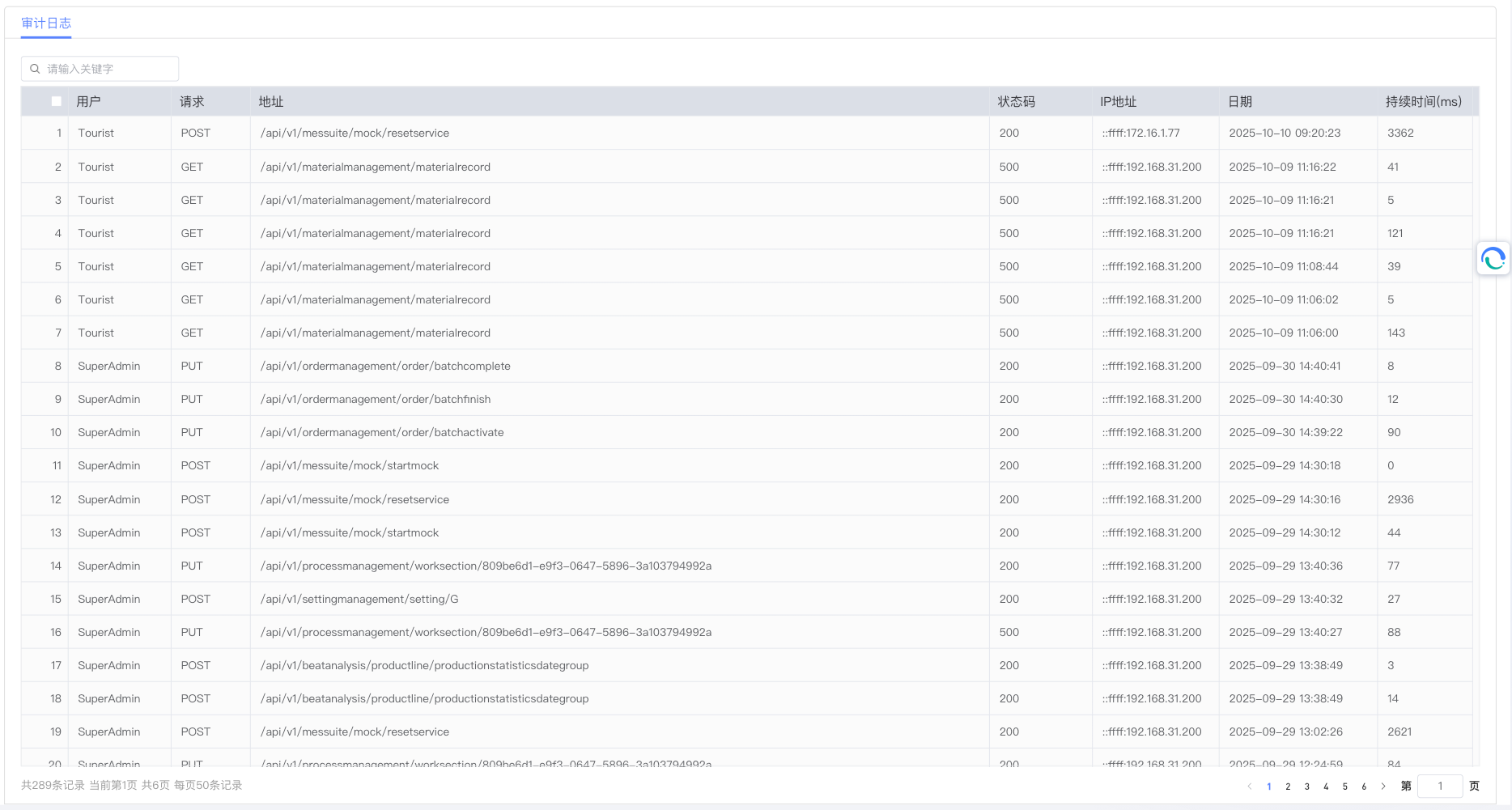
Main Interaction Element Function Description:
- Search Box: Supports fuzzy matching of URL, UserName, and ClientIpAddress by keywords.
- Pagination Control: Located at the bottom of the list, providing pagination navigation function, supporting custom display items per page.
- View Details Button: Operation button on the right side of each log record, click to view detailed information of that record.
3.2 Audit Log Detail Viewing
To view detailed information of an audit log, simply click the "View Details" button of the corresponding record in the list view. The system will display the complete information of the audit record, including request context, operation details, and entity change records.
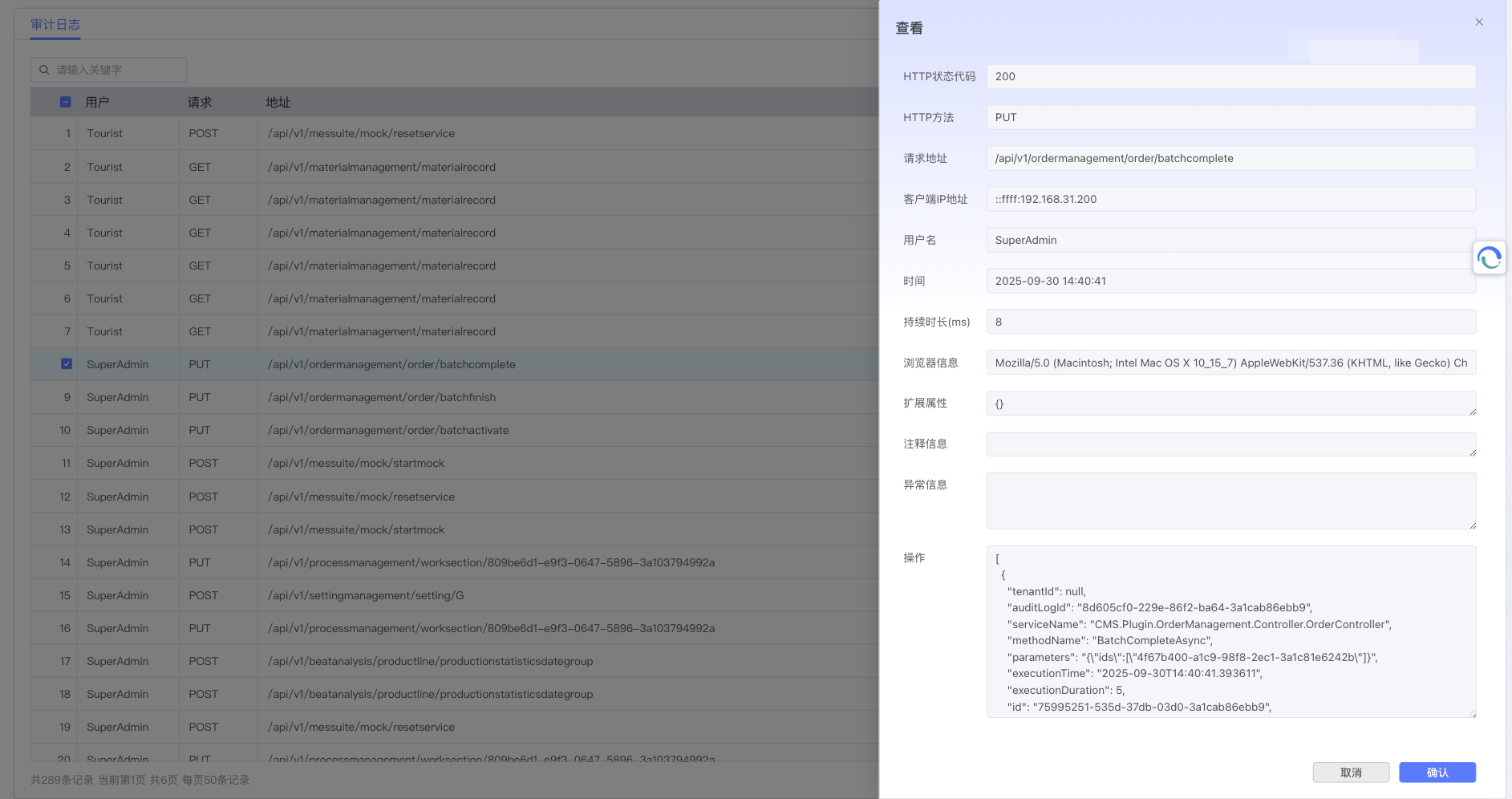
Detail Page Main Information Element Description:
- Basic Information: Displays core information such as execution time, execution duration, HTTP method, URL, status code, etc. of the audit record.
- User Information: Displays User ID, Username, Client IP Address, Browser Information, etc. of the user performing the operation.
- Request Context: Displays complete context information of the request, including Correlation ID, Client Information, etc.
- Operation Details: Displays the specific operation list executed in this request, including Service Name, Method Name, Parameters, Execution Time, etc.
- Entity Change Records: Displays entity change information involved in this request, including Change Type (Create, Update, Delete), Entity Type, and specific Property Change Details (Original Value and New Value).
- Exception Information: If an exception occurs during request execution, exception details and stack information will be displayed here.
- Return Button: Located at the top of the page, click to return to the Audit Log List View.
4. Best Practices and Precautions
4.1 Log Query Optimization
- Regular Cleanup and Archiving: Audit logs will continue to grow as the system runs. It is recommended to regularly archive or clean up historical logs to maintain system performance.
4.2 Security and Privacy Protection
- Sensitive Data Processing: The system automatically desensitizes sensitive data, but care should still be taken to protect user privacy information when viewing and sharing logs.
- Access Control: Ensure that only authorized administrators can access the Audit Log module. It is recommended to manage permissions through RBAC (Role-Based Access Control).
- Log Integrity Protection: Audit logs themselves should be protected from tampering or deletion to ensure the integrity and credibility of log data.
4.3 Troubleshooting Tips
- Trace Exception Logs: When a system problem occurs, first check log records containing exceptions. Exception information usually provides direct clues to the problem.
- Analyze Execution Duration: For performance problems, system bottlenecks can be analyzed by filtering log records with long execution durations.
4.4 System Configuration Suggestions
- Reasonably Set Log Retention Policy: Set appropriate log retention periods based on business needs and compliance requirements.
- Optimize Storage Configuration: For high-traffic systems, it is recommended to optimize audit log storage, such as using independent databases or partitioned tables.
- Monitor Log Growth: Regularly monitor the growth of audit logs and adjust storage policies and cleanup plans in time.
Through reasonable use of the Audit Log module, administrators can effectively monitor system security, troubleshoot problems, and meet compliance requirements, providing strong guarantees for the stable operation of the LMES system.