Language Management
1. Module Overview
Core Function: The Language Management module of the LMES system provides multi-language support functions, allowing users to enable/disable different languages, translate text, import and export translation data, and download JSON translation resource files recognizable by the program. This module aims to help users build application systems that support multiple languages and meet internationalization needs.
- Component Identifier: LanguageManagement
- Component Name: Language Management
- Component Category: run (Plugin)
2. Scenario Description
The Language Management module is applicable to the following business scenarios:
- International Application Development: When the system needs to support multi-language interfaces, configure translation texts for different languages through this module.
- Translation Content Management: Centrally translate and manage texts in the system, supporting automatic translation and manual translation.
- Translation Data Migration: Realize batch processing and cross-system migration of translation data through importing/exporting Excel files.
- Development Resource Generation: Directly download JSON translation resource files recognizable by the program for development integration.
3. Function Introduction
Interface Overview
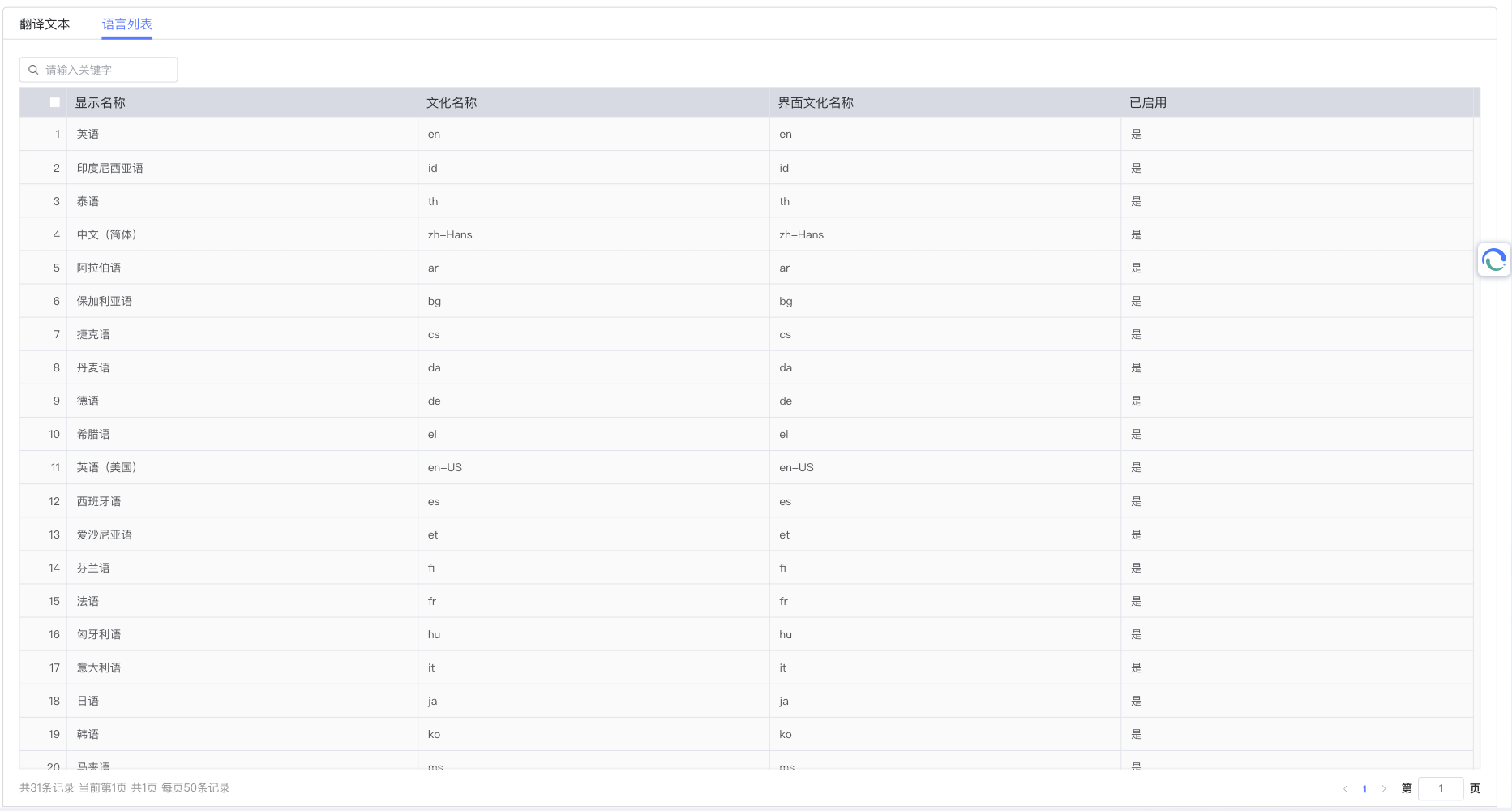
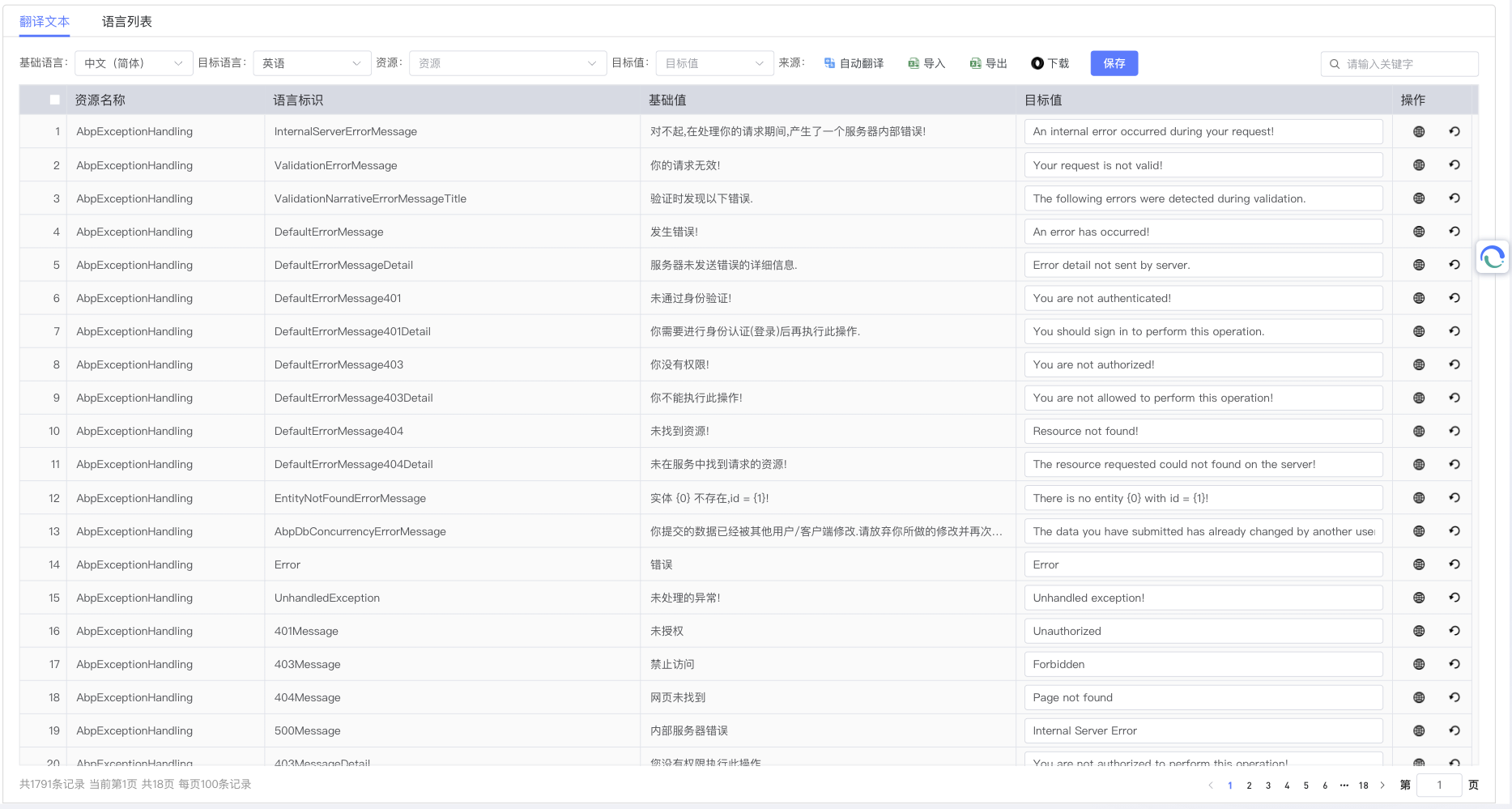
The Language Management module mainly includes two core views: Language List View and Translation Text View. The Language List View is used to manage language types supported by the system (such as enabling/disabling languages), and the Translation Text View is used to manage specific text translation content.
3.1 Language List Management
The Language List View displays all language options supported by the system. Users can view the languages provided by the system and perform relevant operations here.
The language list interface is based on the Language entity, displaying all language configuration information supported by the system. Each language record contains core attributes such as Culture Name (CultureName), Interface Culture Name (UiCultureName), Display Name (DisplayName), Flag Icon (FlagIcon), and Enabled Status (IsEnabled). The system provides pagination query, detail viewing, status management, and icon display functions, and supports enabling/disabling language status switching through API interfaces.
3.2 Translation Text Management
The Translation Text View is used to manage text content that needs to be translated in the system, providing various translation methods and data management functions.
3.2.1 Text Translation Methods
The system supports the following translation methods:
-
Automatic Translation:
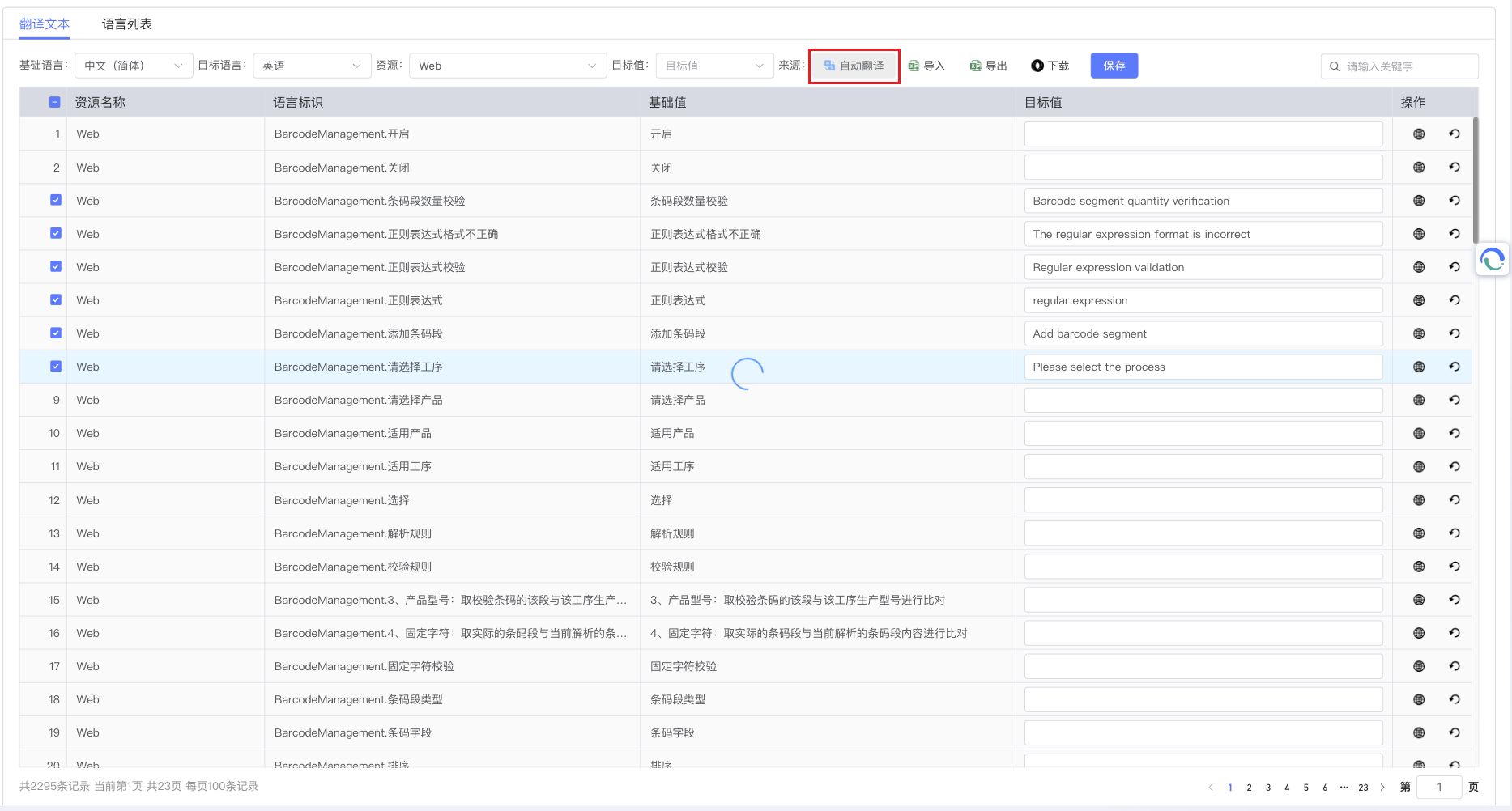
- Batch Automatic Translation: Select the original text to be translated, click the [Auto Translate] button, and the system will automatically translate the selected text.
- Single Automatic Translation: Click the [Translate] button corresponding to the original text, and the system will automatically translate the text.
-
Manual Translation:
- Batch Quick Translation: Select the original text to be translated, click the [Quick Translate] button, and batch input translation text.
- Single Manual Translation: Directly enter or modify the translation text in the translation column corresponding to the original text.
3.2.2 Advanced Data Management
The system provides enterprise-level data management functions:
- Excel Import/Export: Based on LanguagesImportModel and LanguageTextsImportModel, supports complex Excel template import/export. When exporting, it includes the original text column and translation columns of all enabled languages; when importing, it matches based on the original text and imports the translation content into the translation column of the corresponding language.
- JSON Resource Generation: Automatically generates JSON format translation resource files recognizable by front-end frameworks, conforming to program reading specifications, which can be directly integrated into front-end applications for use.
- Culture Resource Management: Supports multi-dimensional filtering and management by resource name, culture name, etc.
- Data Integrity: Ensures the integrity and consistency of translation data, supports data verification and error handling.
3.2.3 Runtime Localization
The DynamicResourceLocalizer component implements runtime dynamic localization:
- Dynamic Resource Loading: Load new translation resources without restarting the application.
- Cache Optimization: Adopt intelligent caching strategy to improve translation resource access performance.
- Fallback Mechanism: Automatically fallback to the default language when a specific translation does not exist.
- Culture Awareness: Automatically identify user culture settings and provide personalized language experience.
3.3 Multi-language Debugging
To ensure translation effects, the Language Management module provides multi-language debugging functions:
- Open any [Page], click the [Multi-language] button in the operation bar.
- The system will switch the page original text to the debugging language.
- If the translation text is too long or displayed abnormally, you can adjust the font size, control length, move position, input line breaks, etc., to display the text with the best effect.
4. Best Practices and Precautions
4.1 Enterprise-level Translation Process
-
Standardized Process Establishment:
- Establish a standardized translation process, a complete link from text extraction to translation release.
- Use the Excel export function to uniformly export texts that need to be translated and hand them over to a professional translation team for processing.
- Establish a translation terminology database to ensure the consistency and accuracy of corporate terminology.
-
Quality Control Mechanism:
- Manual proofreading must be performed after automatic translation to ensure translation quality meets corporate standards.
- Establish a translation review process, and important texts need multi-level review before release.
- Regularly conduct translation quality assessments to continuously optimize translation effects.
-
Technical Architecture Optimization:
- Make full use of the caching mechanism of DynamicResourceLocalizer to reduce repeated translation requests.
- Reasonably set translation cache expiration time to balance real-time performance and performance.
- Use batch import and export functions to reduce API call frequency and network overhead.
4.2 Development Integration Guide
-
Front-end Integration Best Practices:
- Use standardized JSON format to load translation resources to ensure compatibility with front-end frameworks.
- Implement lazy loading mechanism to load translation resources on demand and improve page loading speed.
- Establish language switching event mechanism to ensure language switching consistency of interface elements.
-
Back-end Integration Considerations:
- Follow the modular design principles of the ABP framework to ensure good integration with other modules.
- Establish a unified exception handling mechanism to ensure consistency and readability of API errors.
- Use asynchronous programming patterns to improve the system's concurrent processing capability.
-
Data Management Suggestions:
- Regularly backup translation data to ensure data security and recoverability.
- Establish a data cleanup mechanism to regularly clean up expired and useless translation records.
- Use data version management to support translation history traceability and rollback.
5. Appendix
5.1 Core Technical Architecture
The Language Management module adopts Domain-Driven Design (DDD) architecture and is implemented based on the ABP framework:
- Language Entity: Inherits from
FullAuditedAggregateRoot<Guid>, containing attributes such as CultureName, UiCultureName, DisplayName, FlagIcon, IsEnabled, etc. - LanguageText Entity: Inherits from
AuditedEntity<Guid>, containing attributes such as ResourceName, CultureName, Name, Value, etc. - DynamicResourceLocalizer: Implements runtime dynamic localization, supporting cache optimization and fallback mechanism.
- RESTful API: Provides standardized API interfaces, supporting permission control and data verification.
5.2 JSON Resource File Format Specification
The system-generated JSON translation resource file follows the standard format:
{
  "culture": "en-US",
  "resourceName": "Web",
  "texts": {
    "WelcomeMessage": "Welcome to our system",
    "LoginButton": "Login",
    "LogoutButton": "Logout",
    "HomePage": "Home Page"
  },
  "metadata": {
    "version": "1.0.0",
    "generatedAt": "2024-01-01T12:00:00Z",
    "source": "backend"
  }
}
The file uses UTF-8 encoding to ensure correct display of multi-language characters and can be directly integrated into front-end frameworks for use.