LMES Standard Process Check-out Flow - Business Interaction Specification
1. Standard Check-out Interaction Flow
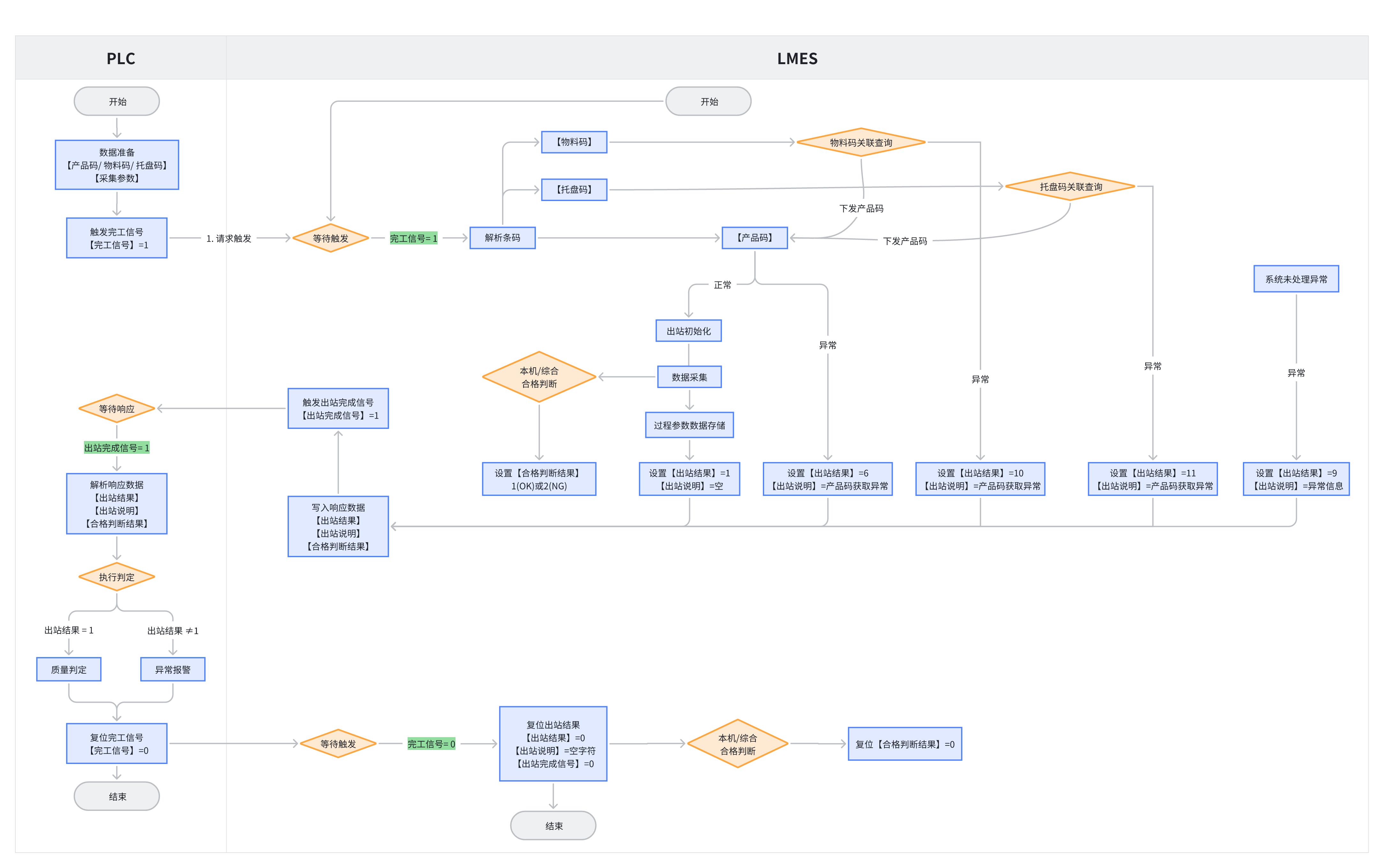
2. Interaction Variables and Result Codes
| Interaction Point | Direction | Data Type | Description |
|---|---|---|---|
| Complete Signal | PLC -> LMES | Bool | Complete signal. PLC sets to 1 to start the process. PLC is responsible for reset. |
| Product Code | PLC -> LMES | String | Check-out product serial number. Unique product identifier provided by PLC to LMES. |
| Pallet Code | PLC -> LMES | String | Check-out pallet code. Used when associating products through pallet code. |
| Material Code | PLC -> LMES | String | Check-out material code. Used when associating products through material code. |
| Equipment Processing Result | PLC -> LMES | Int | PLC judgment result. When "PLC Judgment" is enabled, PLC writes its judgment result (1=OK, 2=NG) into this variable. |
| Check-out Complete Signal | LMES -> PLC | Bool | Check-out complete signal. LMES sets to 1 after processing is complete. LMES is responsible for reset. |
| Check-out Result | LMES -> PLC | Int | Check-out result code. LMES informs PLC of the final status of this interaction, which is the most important result signal. PLC should execute corresponding operations based on this code: • 1: Success - Release product normally. • 6: Product Code Abnormal - Failed to get product code or product code is empty. Recommend alarm and pause line, wait for manual handling. • 9: Other Abnormal - Unknown error occurred within system. Recommend alarm and pause line, wait for manual handling. •10: Material Code Not Bound - PLC provided material code, but system cannot find corresponding product. Recommend alarm. •11: Pallet Code Not Bound - PLC provided pallet code, but system cannot find corresponding product. Recommend alarm. • 0: Reset - After interaction is complete, LMES will reset this signal to 0. |
| Qualification Judgment Result | LMES -> PLC | Int | Quality judgment result. LMES informs PLC of the final product quality conclusion (1=OK, 2=NG). Note: Only sent down when "PLC Judgment" is not enabled. |
| Check-out Description | LMES -> PLC | String | Result description. When an exception occurs, LMES can write more detailed text description. |
3. Exception Troubleshooting Guide
When exceptions occur in the check-out process (such as product not released, equipment alarm), please follow these steps for troubleshooting.
Step 1: Check LMES Feedback Signals
First check the three key result variables written by LMES to PLC:
- Check-out Result: This is the most direct fault code.
- If the value is any value other than 1 (such as 6, 9, 10, 11), it indicates that LMES encountered an error while processing business. Please refer to the description of the check-out result variable in the previous section to locate the problem cause.
- Check-out Description: This is the most useful troubleshooting information.
- When an exception occurs, LMES will write detailed, readable error text into this variable. For example, "Material code XXXXX not bound to product". Please display this variable content on the HMI or monitoring interface.
- Qualification Judgment Result:
- Check whether this value meets expectations. If the product should be NG but this value is OK (or vice versa), then the LMES judgment logic or the original data provided by PLC needs to be checked.
Step 2: Verify Signal Handshake Process
If LMES feedback signals appear normal, but the process is still stuck, please verify whether the standard "handshake" timing is complete. Non-standard signal states are potential sources of problems.
- Is Complete Signal set to 1?
- If PLC has not set this signal to 1, LMES will not start the process.
- Is Check-out Complete Signal set to 1?
- If PLC has requested, but this signal has not been set to 1, it indicates that LMES internal logic may still be processing or a serious error has occurred. At this time, focus on checking the content of Check-out Description.
- Has Complete Signal been reset to 0?
- According to the principle of "whoever triggers, whoever resets", this signal must be cleared by PLC. If the PLC program fails to clear it, although LMES is compatible with this abnormal situation to ensure line operation and can start new processes, this non-standard state is the root cause of potential problems and must be corrected in the PLC program.
- Have Check-out Complete Signal and other LMES signals been reset?
- At the end of the interaction, LMES should reset all signals it triggered. If these signals remain at 1, they may interfere with the judgment of the next check-out request or generate warnings in the LMES log.
Step 3: Use LMES Workstation Console
If more detailed information is needed, please use the Workstation Console function provided by the LMES system.
- Real-time Variable Monitoring: Can see the current values of all interaction points in real-time.
- Process Logs: Can see detailed business execution steps, locate which specific step the problem occurred.
- Warnings and Errors: Will highlight all error and warning information.
Step 4: Special Scenario Troubleshooting
Check-in and Complete Time Consistent
Phenomenon: When viewing processing records, it is found that the "check-in time" and "complete time" of a certain process are exactly the same.
Reason: This is usually by design, not a system error. This situation occurs at data collection points or pass-through workstations. Such workstations do not perform any time-consuming processing physically. Their only purpose is to record a "pass" event by scanning the product code when the product flows through. Since the product does not stay, check-in (scanning) and check-out (recording complete) occur instantaneously in logic, so the system assigns them the same timestamp.
Troubleshooting Suggestion: Confirm whether the business type of this workstation is indeed data collection or pass-through. If so, this phenomenon is normal.